What Is Browser Fingerprinting Explained In Plain English
Browser fingerprinting is a tracking technique that collects unique characteristics of your device and browser to identify you across websites without using cookies. It combines dozens of small data points into a nearly unique digital profile that follows you as you browse.
If you have ever wondered what is browser fingerprinting and why privacy tools keep warning you about it, you are not alone. Every time you open a website, your browser quietly shares a long list of technical details about your device, operating system, screen size, fonts, and even your typing habits — and companies can stitch those details together to recognize you on your next visit.
- How it works: Combines device, browser, and system data points into a unique ID that tracks you.
- Why it matters: Companies use it for fraud prevention, ad targeting, and analytics — often without your.
- Privacy risk: Happens invisibly, works in private browsing, and has no standard opt-out mechanism.
- Protection: Privacy browsers, fingerprint-blocking extensions, and JavaScript controls can reduce exposure.
- vs cookies: Cookies can be deleted; fingerprints are derived from device characteristics and are much harder.
What Is Browser Fingerprinting?
Browser fingerprinting is a tracking technique that builds a unique digital profile of your device and browser by collecting dozens of small data points. Unlike cookies, which are small files stored on your computer, a fingerprint is created from information your browser already sends to every website you visit — often without leaving any visible trace on your device.
The term “fingerprint” is fitting because, like a human fingerprint, no two browsers look exactly alike. When you combine your screen resolution, installed fonts, time zone, language settings, hardware type, and dozens of other signals, the combination is often distinctive enough to single you out among millions of users.
How Browser Fingerprinting Works
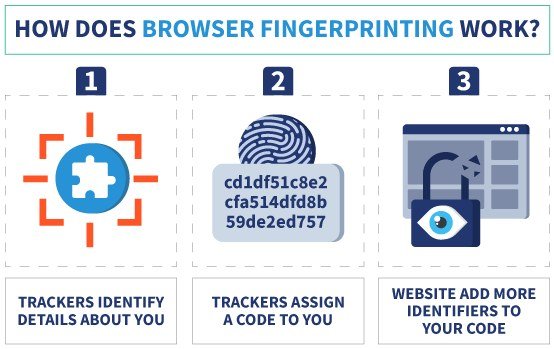
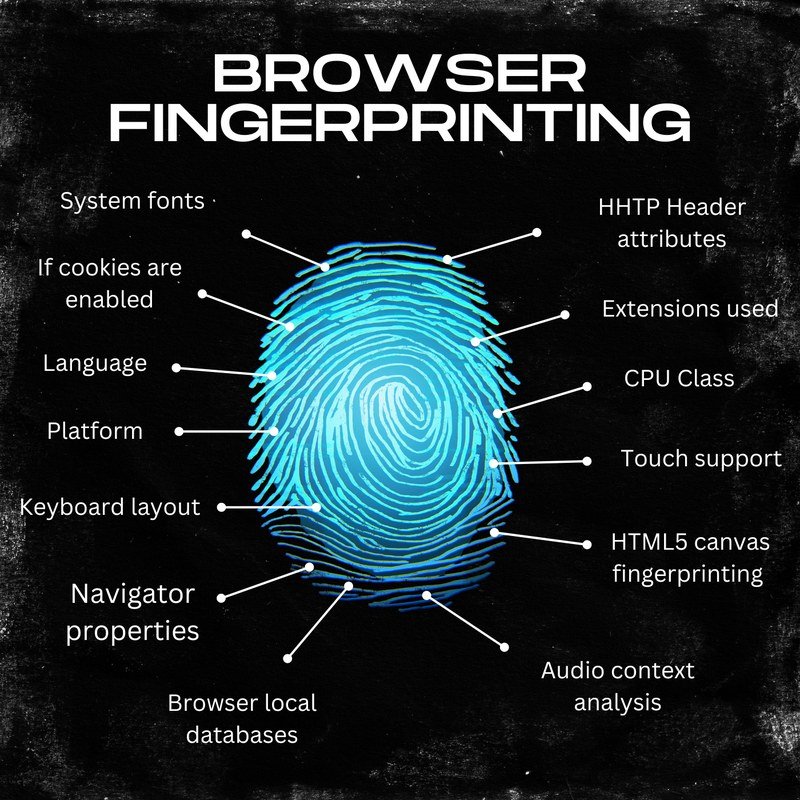
A diagram illustrating how browser attributes combine to form a unique identifier.
Fingerprinting works by gathering many small pieces of information that your browser reveals during a normal website visit. Each piece on its own seems harmless — your browser version, for example, or your preferred language. But when combined, these data points form a pattern that is surprisingly unique to you.
The Building Blocks of a Digital Fingerprint
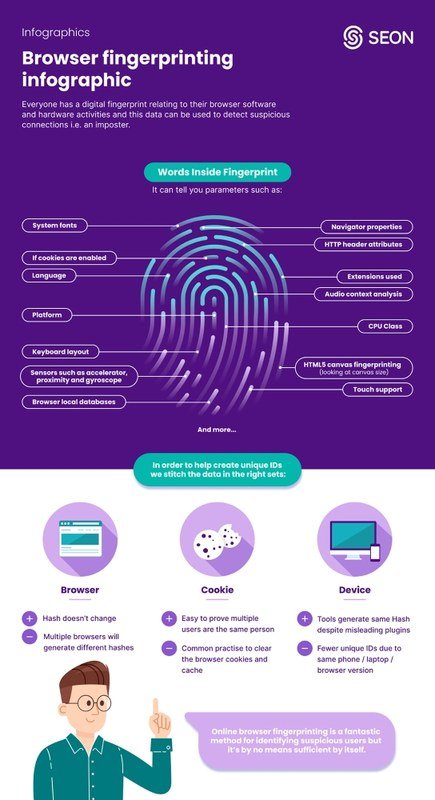
Here are some of the most common data points used to build a browser fingerprint:
- User agent string: Your browser sends a text string identifying its name, version, and operating system.
- Screen resolution and color depth: The size of your display and how many colors it can show.
- Installed fonts: The list of fonts available on your system, which varies widely between devices.
- Time zone and language: Your regional settings reveal where you are located.
- Hardware information: Details about your CPU, GPU, and available memory.
- Browser plugins and extensions: Which add-ons you have installed and enabled.
- Canvas fingerprinting: Your browser draws a hidden image and records the exact pixel output, which differs by GPU and driver.
- WebGL data: Graphics rendering details that vary by hardware.
- Touch screen support: Whether your device has a touch interface.
- Audio context: Subtle differences in how your device processes audio signals.
Canvas fingerprinting alone can be enough to identify a large percentage of users. The technique was first demonstrated publicly in 2012, and it remains one of the most effective fingerprinting methods because it captures hardware-level rendering differences that are nearly impossible to spoof.
How Data Points Combine Into a Unique ID
Each data point is assigned a value, and the values are combined into a hash — a short string of characters that acts as a digital identifier. When you visit a site again, the site repeats the process and compares the new hash with the one it stored earlier. If they match closely enough, the site knows it is you.
The math behind this is powerful. Researchers have estimated that the combination of just a handful of these signals can produce billions of possible combinations, making most browser fingerprints effectively unique among the general population. Even small changes — like installing a new font or updating your browser — can alter your fingerprint, which is why some trackers use “fuzzy matching” to recognize you even when minor details change.
Why Companies Use Browser Fingerprinting
Companies use browser fingerprinting for several reasons, some legitimate and some less so. On the legitimate side, banks and payment processors use fingerprinting to detect fraud. If someone logs into your account from a device that does not match your usual fingerprint, the system can flag the attempt as suspicious and require additional verification.
Advertisers and analytics firms use fingerprinting for a different reason: to track users across websites without relying on cookies. This is especially valuable because third-party cookies are being phased out by major browsers. Fingerprinting fills that gap by providing a cookie-free way to recognize returning visitors, build advertising profiles, and measure campaign effectiveness.
Some platforms also use fingerprinting to enforce licensing restrictions, detect account sharing, or prevent bots from creating fake accounts. In each case, the goal is the same — to identify a specific user or device even when traditional tracking methods are blocked. This type of tracking is also closely tied to how modern search and recommendation systems learn about user behavior, much like the way AI-powered tools analyze browsing patterns to personalize results. Similarly, the same way AI chatbots collect user data to improve their responses, fingerprinting data helps companies refine their tracking models.
The Privacy Risks and Limitations of Fingerprinting<
A digital fingerprint and lock icon illustrate browser tracking privacy concerns.
A digital fingerprint and lock icon illustrate browser tracking privacy concerns.
The biggest privacy concern with browser fingerprinting is that it happens invisibly. There is no file stored on your device, no obvious indicator that tracking is occurring, and no easy way to opt out. Even in private browsing mode, your fingerprint remains largely intact because it is based on device characteristics, not stored data.
Fingerprinting also raises concerns about cross-site tracking. A fingerprint collected on one website can be shared with advertising networks and used to recognize you on dozens of other sites, building a detailed picture of your browsing habits, interests, and even sensitive topics like health or political views.
- Helps banks and payment platforms detect fraud and unauthorized access
- Works without cookies, making it useful as third-party cookies are phased out
- Can help websites block bots and automated abuse
- Invisible tracking with no clear opt-out mechanism
- Can follow you across sites to build detailed advertising profiles
- Hard to block completely without specialized privacy tools
There are also limitations. Fingerprints are not perfect. If a user updates their browser, changes screen resolution, or installs new fonts, the fingerprint can change. Some users also share identical devices — for example, the same model of phone with the same OS version — which can reduce uniqueness. And because fingerprinting relies on JavaScript, users who disable JavaScript entirely can avoid most fingerprinting attempts, though this also breaks many modern websites.
Fingerprinting data is also a target for cybercriminals. If a fingerprint is linked to a user account and that account is compromised, the fingerprint can be used to impersonate the user or to validate stolen credentials. This is one reason why security experts recommend treating fingerprinting data with the same caution as other personal information. It is also worth remembering that phishing attacks often rely on similar kinds of personal data to make scams more convincing, so protecting your digital identity matters beyond just browser tracking.
Browser Fingerprinting vs. Cookies: Key Differences
Cookies and browser fingerprints both serve the same purpose — recognizing you when you return to a website — but they work in fundamentally different ways.
| Feature | Cookies | Browser Fingerprinting |
|---|---|---|
| Storage | Stored as small files on your device | No file stored; derived from device characteristics |
| User control | Can be viewed and deleted in browser settings | No direct way to view or delete |
| Persistence | Cleared when you delete browsing data | Persists until device characteristics change |
| Privacy mode | Blocked in incognito/private mode | Still works in private mode |
| Opt-out | Cookie banners and settings allow opt-out | No standard opt-out mechanism |
The key takeaway is that cookies are a user-visible, user-controllable technology, while fingerprinting is invisible and much harder to manage. That is why privacy advocates have pushed for stricter regulations around fingerprinting, and why some browsers now include built-in fingerprinting protections.
How to Detect and Protect Yourself in 2026
Fully blocking browser fingerprinting is difficult, but you can significantly reduce your exposure with the right tools and habits. The goal is not perfection — it is making your fingerprint less consistent and less useful to trackers.
Signs You’re Being Fingerprinted
Fingerprinting is designed to be invisible, so you will not see a notification or pop-up. However, there are some indirect signs. If you notice that ads follow you across websites even after you clear your cookies, fingerprinting may be involved. Similarly, if a site remembers you immediately even in private browsing mode, that is a strong indicator of fingerprinting.
You can also check your fingerprint using online tools like Cover Your Tracks (from the EFF) or AmIUnique. These services generate a fingerprint from your current browser and show you how unique it is compared to other visitors. Running the test from different browsers on the same device can also show you how much your fingerprint varies.
Privacy Tools and Browser Settings That Actually Work
Several approaches can meaningfully reduce fingerprinting:
- Use a privacy-focused browser: Browsers like Brave and Firefox (with strict tracking protection) include built-in fingerprinting defenses that add noise to your fingerprint or block fingerprinting scripts entirely.
- Install fingerprint-blocking extensions: Extensions like Privacy Badger and Canvas Blocker interfere with fingerprinting scripts by blocking them or feeding them false data.
- Disable JavaScript when possible: Since most fingerprinting relies on JavaScript, disabling it blocks the tracking — but it also breaks many sites, so this is only practical for certain browsing sessions.
- Keep your browser updated: Newer browser versions often include improved anti-fingerprinting measures.
- Use a VPN: A VPN hides your IP address and can mask your general location, though it does not stop fingerprinting by itself.
- Standardize your device: Using default settings, default fonts, and a common screen resolution makes your fingerprint less unique.
Use different browsers for different purposes. Keep one browser for everyday browsing with privacy protections enabled, and use another for tasks that require logging into sensitive accounts. This splits your fingerprint across multiple identities, making cross-site tracking much harder.
Common Mistakes and Misconceptions
Several myths about browser fingerprinting persist, and clearing them up can help you make better privacy decisions.
- Clear your cookies regularly and use private browsing for sensitive activities
- Use a privacy-focused browser with fingerprinting protection built in
- Check your fingerprint uniqueness with online tools to understand your exposure
- Assuming incognito mode protects you from fingerprinting — it does not
- Believing a VPN alone stops fingerprinting — it only hides your IP address
- Thinking deleting cookies erases your fingerprint — it does not affect device-based tracking
Another common misconception is that fingerprinting is illegal. In many regions, including the European Union under GDPR, fingerprinting without user consent is a violation of privacy regulations. However, enforcement varies, and many companies continue to use it because detection is difficult. The legal landscape is still evolving, and users should not assume that any website they visit is following the rules.
Final Verdict: Should You Worry About Browser Fingerprinting?
Browser fingerprinting is not inherently malicious — it is a tool, and like any tool, it depends on how it is used. Fraud detection and bot prevention are legitimate uses that benefit users. But the same technology is also used for invisible cross-site tracking, advertising profiling, and in some cases, data collection that users never consented to.
The honest answer is that you should be aware of fingerprinting and take reasonable steps to protect your privacy, but you do not need to panic. For most people, using a privacy-focused browser, installing a reputable blocking extension, and being mindful of which sites you share personal information with is sufficient. The threat is real, but it is manageable with the right habits.
- Browser fingerprinting combines device and browser characteristics into a unique ID that tracks you across sites without cookies.
- It is used for both legitimate purposes (fraud detection) and privacy-invasive ones (ad tracking).
- Unlike cookies, fingerprints cannot be deleted and work in private browsing mode.
- Privacy browsers, blocking extensions, and JavaScript controls can reduce but not eliminate fingerprinting.
- Staying informed and using layered privacy protections is the most practical approach.
Frequently Asked Questions