What Data Does ChatGPT Collect from Your Conversations
ChatGPT collects your conversation content, account details, and technical metadata like IP address and device info. You can limit how that data is used by opting out of training, using temporary chat, and reviewing your Memory settings.
Understanding what data does ChatGPT collect is the first step toward using the tool without handing over more than you intend. The honest answer is more layered than a simple list: training data, retention windows, and account-type differences all change what happens to your words after you hit send. This guide breaks down each data category, explains how OpenAI uses it, and walks through the settings that give you real control.
- Three data categories: ChatGPT collects conversation content, account information, and technical metadata.
- Training opt-out exists: Consumer users can disable training use in Settings → Data controls.
- Deletion is limited: Deleting a chat removes it from history but not from already-trained models.
- Temporary chat isn’t invisible: Incognito mode skips history but not safety processing.
- Account type matters: Business and API data have stricter default protections than consumer accounts.
What Data Does ChatGPT Collect? The Short Answer
ChatGPT collects three broad categories of information:
1. Conversation content. Every prompt you type, every reply the model generates, and any files, images, or voice recordings you share within a chat.
2. Account information. The email address, name, phone number, and payment details tied to your OpenAI account. This is the identity layer that connects all your activity.
3. Technical and usage metadata. Your IP address, device type, browser, operating system, approximate location, and timestamps of when you use the service.
That’s the honest, non-technical summary. The real nuance is in how long each type of data sticks around, whether it’s used for training, and which settings actually change that outcome.
Why This Question Matters More Than Ever in 2026
ChatGPT is no longer just a text box. It’s a voice assistant, an image generator, a document analyzer, and a memory-enabled assistant that can recall personal details across sessions. Every one of those features expands the data surface. A single conversation in 2026 might include your voice, a spreadsheet you uploaded, your work calendar, and personal facts stored in Memory — all processed by the same system.
At the same time, privacy regulations and corporate data policies have tightened. Employers, schools, and businesses now ask hard questions about what happens to sensitive information entered into AI tools. Knowing what data does ChatGPT collect is no longer just a personal curiosity; it’s a professional and legal consideration.
Breaking Down Exactly What ChatGPT Collects
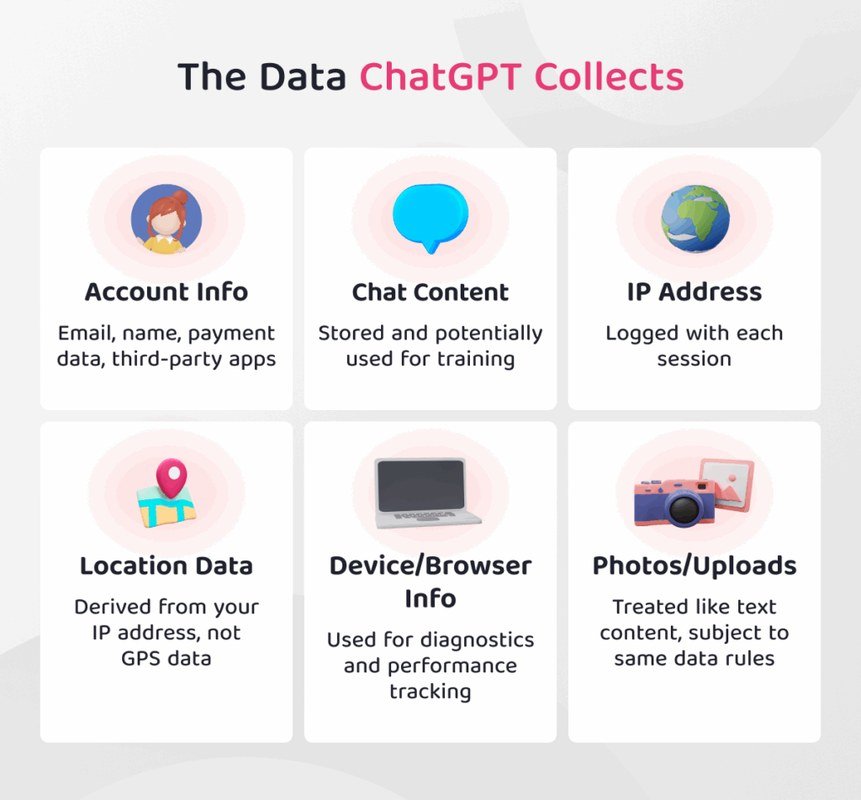
A conceptual image illustrates ChatGPT's data collection, featuring a chat window and data storage icons.
Conversation Content: Your Prompts, Replies, and Uploaded Files
The most obvious data category is the conversation itself. When you type a prompt, ChatGPT sends it to OpenAI’s servers, where it’s processed to generate a response. That includes:
- Your text prompts and follow-up messages
- The model’s generated replies
- Uploaded files such as PDFs, spreadsheets, images, and documents
- Voice recordings from voice mode or voice input
- Images captured or uploaded for vision features
OpenAI’s stated purpose for retaining this content is to improve its models, monitor for abuse, and provide the service itself. Whether your conversations are actually used for training depends on your account type and your privacy settings.
Account and Registration Data: What OpenAI Knows About You
To use ChatGPT, you need an account, and that account is built on identifiable information:
- Email address
- Display name
- Phone number, used for account verification in many regions
- Payment information for paid plans like ChatGPT Plus, Pro, or Team
- Login and authentication logs
This is fairly standard for a software service, but it matters because it links your conversations to a real identity. Your chats aren’t anonymous; they’re attached to your account, and OpenAI can associate them with you.
Technical and Usage Metadata: IP Addresses, Device Info, and Timestamps
Beyond what you type, ChatGPT collects technical signals about how you access the service:
- IP address and approximate geographic location
- Device type, operating system, and browser
- App version and platform (web, iOS, Android, desktop)
- Timestamps of when you start and end sessions
- Feature usage patterns — which tools you use and how often
This metadata is less personal than your prompts, but it’s still identifying. Combined with account data, it creates a detailed picture of when, where, and how you use ChatGPT.
| Data Category | What It Includes | How Personal Is It? |
|---|---|---|
| Conversation content | Prompts, replies, uploaded files, voice, images | Highly personal — may contain private or sensitive information |
| Account data | Email, name, phone, payment details | Directly identifies you |
| Technical metadata | IP address, device, browser, timestamps | Indirectly identifies you |
How OpenAI Actually Uses the Data It Collects
Training and Model Improvement: Where Your Conversations End Up
OpenAI has been transparent that conversations from consumer ChatGPT accounts may be used to train and improve its models — unless you opt out. This is the most significant use of your data because it means your words can influence future AI behavior and persist long after you’ve deleted a chat.
There’s an important distinction: data from ChatGPT Enterprise, Team, and the API is not used for training by default. If you’re using ChatGPT through a business account, the privacy calculus is different from a personal free account.
Account type changes everything. Consumer accounts can have conversations used for training unless you opt out. Business and API accounts have stricter default protections. Always check which account type you’re actually using.
Safety, Abuse Monitoring, and Legal Compliance
OpenAI also processes conversations to detect abuse, prevent harmful content, and comply with legal obligations. This is why even users who opt out of training still have their conversations temporarily retained for review. If OpenAI receives a legal request — such as a court order or subpoena — it may be required to share data with law enforcement.
This is standard practice for online platforms, but it’s worth understanding: there is no version of ChatGPT where your data exists only on your device. Everything you type crosses OpenAI’s servers.
Service Delivery: Why Some Data Is Necessary to Function
Some data collection is unavoidable. To generate a response, ChatGPT must process your prompt. To maintain a conversation thread, it must store the context. To keep you logged in, it needs authentication tokens. This is the “necessary to function” category, and it applies to every user regardless of privacy settings.
The distinction that matters is between data required to run the service and data used for secondary purposes like training, advertising, or analytics.
Data Retention: How Long Does ChatGPT Keep Your Conversations?
Chart illustrating the length of time ChatGPT retains conversation data.
Default Retention Periods and What Happens After Deletion
OpenAI’s published policies describe different retention windows depending on account type and privacy choices. For consumer accounts that opt out of training, conversations are typically retained for a limited review period — often cited as around 30 days — before being permanently deleted. For accounts that allow training use, conversations may be retained longer.
These windows have changed over time and vary by region and account tier. The exact number of days matters less than the underlying principle: deletion is not instant, and there is always a window where your data still exists on OpenAI’s systems.
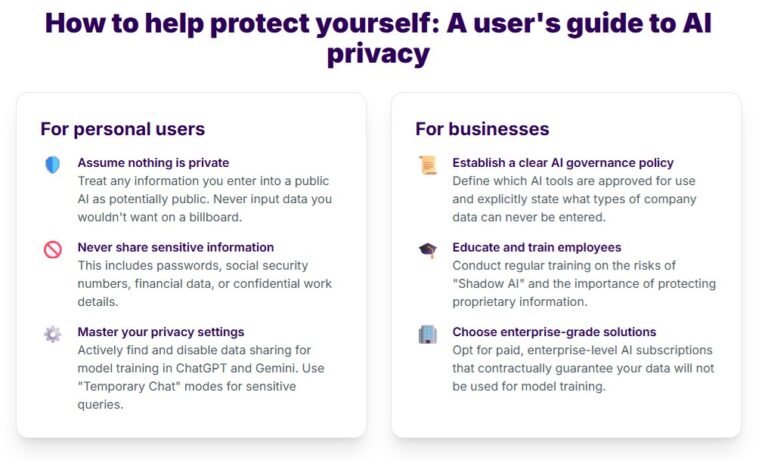
Treat every conversation as if it could be read by a human reviewer. Even with training opt-out and temporary chat enabled, OpenAI’s safety systems process your content. Never share passwords, financial account numbers, medical records, or other sensitive identifiers in ChatGPT.
What Remains in Training Data Even After You Delete a Chat
This is the part most users miss. Deleting a conversation removes it from your visible chat history, and OpenAI says it will remove it from its systems after the applicable retention period. But if that conversation was already used to train a model, the influence of your data is baked into the model’s weights. There is no practical way to remove that contribution retroactively.
In other words: if you don’t want a conversation influencing model training, you must opt out of training before you have the conversation — not after.
Your Privacy Toolkit: How to View, Export, and Delete Your Data
Viewing and Reviewing Your Conversation History
Your chat history is visible in the sidebar of the ChatGPT interface. From there you can review past conversations, search for specific topics, and identify anything you’d rather remove. OpenAI also provides a settings page where you can view account information, connected apps, and data controls.
Exporting Your Data for Personal Records
OpenAI offers a data export tool that packages your conversations, account information, and other data into a downloadable file. This is useful if you want a personal archive before deleting your account, or if you need to review exactly what OpenAI has stored about you.
Click your profile icon and select Settings, then navigate to the Data controls section.
Select the export option and confirm. OpenAI will prepare a downloadable archive of your data.
Check the exported files for anything you want to delete manually before closing your account.
Deleting Conversations and Requesting Account Removal
Individual conversations can be deleted from the sidebar. To remove everything, you can delete your OpenAI account entirely through the account settings. Account deletion is the most thorough option, but it’s also permanent — you’ll lose access to any remaining credits, custom GPTs, or saved settings.
Before deleting an account, export your data first. Once the deletion process completes, there’s no going back.
Privacy Controls That Limit What ChatGPT Collects in 2026
Private or Incognito Mode: Does It Actually Protect You?
ChatGPT’s temporary chat mode (sometimes called incognito) does not save conversations to your chat history. That’s a real benefit if you want to keep your account tidy. But it does not mean the conversation isn’t processed. OpenAI still runs the content through its systems for safety and abuse monitoring, and temporary chats may still be retained briefly for review.
Think of temporary chat as “not saved to my history” rather than “not seen by anyone.”
Memory and Custom Instructions: Trading Privacy for Personalization
The Memory feature lets ChatGPT remember facts about you across conversations — your name, your job, your preferences — so it can personalize responses. Custom Instructions work similarly by letting you set standing context. Both features are convenient, and both expand what OpenAI stores about you.
You can view, edit, or delete individual memories at any time, and you can turn Memory off entirely. The trade-off is simple: less memory means less personalization, but also less data retained.
Opting Out of Training: The Essential Settings to Change
For consumer accounts, the single most important privacy setting is the training opt-out. In Settings → Data controls, you can disable the use of your conversations to improve OpenAI’s models. This doesn’t stop data collection, but it changes what happens to your data after it’s processed.
- Opt out of training in Settings → Data controls before sharing sensitive information
- Use temporary chat for one-off questions you don’t want in your history
- Export your data regularly if you’re a heavy user
- Review and clear Memory entries that contain personal facts
- Assuming deleting a chat removes it from training data
- Sharing passwords, IDs, or medical details in any conversation
- Ignoring the account type — free, Plus, Team, and API all have different rules
- Connecting third-party apps without checking what they can access
Common Misconceptions and Mistakes About ChatGPT Data Collection
Misconception: Deleting a Chat Erases It Completely
Deleting a chat removes it from your visible history and, after the applicable retention period, from OpenAI’s active systems. But if the conversation was already used for training, its influence remains embedded in the model. Deletion is a forward-looking action, not a time machine.
Misconception: Incognito Mode Means No Data Is Collected
Temporary chat avoids saving to your history, but the content is still transmitted to OpenAI’s servers and processed for safety. It’s a privacy convenience, not a confidentiality guarantee.
Mistake: Ignoring Third-Party Integrations and API Usage
ChatGPT connects to a growing ecosystem of third-party apps, plugins, and custom GPTs. Each integration can have its own data handling practices, and some may receive the content you share within that session. The same applies to the API: if you’re a developer building on OpenAI’s API, your prompts and outputs are handled under a different policy than consumer ChatGPT.
Before connecting any third-party tool, check what data it receives and how it’s stored. The ChatGPT privacy policy covers OpenAI’s practices — not those of every app you connect to it.
Final Verdict: How to Protect Your Privacy Without Losing the Benefits
What to Look for in a Privacy-First Chatbot Workflow
A privacy-first workflow doesn’t mean abandoning ChatGPT. It means making deliberate choices: opt out of training, use temporary chat for sensitive one-off questions, keep Memory off unless you truly need it, and never paste confidential information into a prompt. It also means knowing which account type you’re on and reading the data policy that applies to it.
Weighing the Value of Convenience Against Data Exposure
ChatGPT’s most powerful features — Memory, custom instructions, file analysis, voice mode — are also its most data-hungry ones. Every convenience feature is a trade. The question isn’t whether ChatGPT collects data; it’s whether the personalization and productivity gains are worth the additional exposure for your specific use case.
Our Bottom-Line Recommendation for 2026
Use ChatGPT, but use it with intent. Treat every conversation as potentially reviewable, opt out of training before sharing anything sensitive, and make deletion and export part of your routine. The goal isn’t to eliminate data collection — that’s not possible with a cloud-based AI service. The goal is to understand what data does ChatGPT collect and to set the controls so that the data you share is the data you consciously choose to share.
- ChatGPT collects conversation content, account data, and technical metadata — three distinct categories with different retention rules.
- Consumer conversations may be used for training unless you opt out; business and API accounts have stricter defaults.
- Deleting a chat removes it from your history but can’t erase its influence on already-trained models.
- Opt out of training, use temporary chat wisely, and review Memory settings to control your exposure.
- Third-party integrations and API usage have separate data practices you should check before connecting.
Frequently Asked Questions



2 Comments