What Is AI Search and How Does It Work The Ultimate Guide
AI search uses large language models to understand your question and generate a direct, conversational answer with cited sources. It combines live web retrieval with language generation to deliver summarized results instead of a list of blue links.
If you have been wondering what is ai search and how does it work, you are not alone. AI search has quickly become one of the most talked-about changes in how people find information online — and it works very differently from the search engines most of us grew up with.
Instead of returning a page of blue links, AI search reads your question, pulls relevant information from live sources, and writes a direct answer in plain language, usually with citations you can check. This guide explains the technology behind it, what to look for in a good tool, who benefits most, and where it still falls short.
- Definition: AI search generates direct answers by combining large language models with live web retrieval.
- How it works: It retrieves relevant sources, ranks them, and synthesizes a cited response in real time.
- Key difference: AI search understands intent and follow-ups, unlike keyword-based traditional search.
- Watch out: AI can hallucinate, so always check citations and cross-reference important claims.
- Best for: Research, explanations, comparisons, and tasks that need synthesis rather than a list of links.
What Is AI Search? A Clear Definition
AI search is a type of search system that uses artificial intelligence — specifically large language models — to understand a question and generate a synthesized answer instead of simply listing matching web pages. It combines the retrieval power of a search engine with the language abilities of an AI model, allowing it to summarize information from multiple sources, handle follow-up questions, and present results in a conversational format.
The core idea is that you ask a question the way you would ask a person, and the system responds the way a knowledgeable assistant would: with a clear explanation, useful context, and references you can verify. That is a fundamental shift from the keyword-matching model that dominated the web for two decades.
AI Search vs. Traditional Search
Traditional search engines were built around ranking. They crawl billions of pages, index their content, and use algorithms to decide which pages best match your keywords. You get ten blue links and are expected to click through, compare, and draw your own conclusions.
AI search changes that workflow. It still retrieves and ranks web pages, but it then reads those pages, extracts the relevant information, and composes a single answer. That is faster for simple questions, but it also places more responsibility on the system to be accurate — and on you to verify what it says.
| Feature | Traditional Search | AI Search |
|---|---|---|
| Output format | List of ranked links | Conversational answer with citations |
| Question handling | Matches keywords | Understands intent and context |
| Follow-up questions | Usually requires a new search | Can continue the conversation |
| Source verification | User clicks and compares | System summarizes; user should verify |
| Best for | Navigating to known sites | Explanations, comparisons, research |
How Does AI Search Work? The Technology Explained

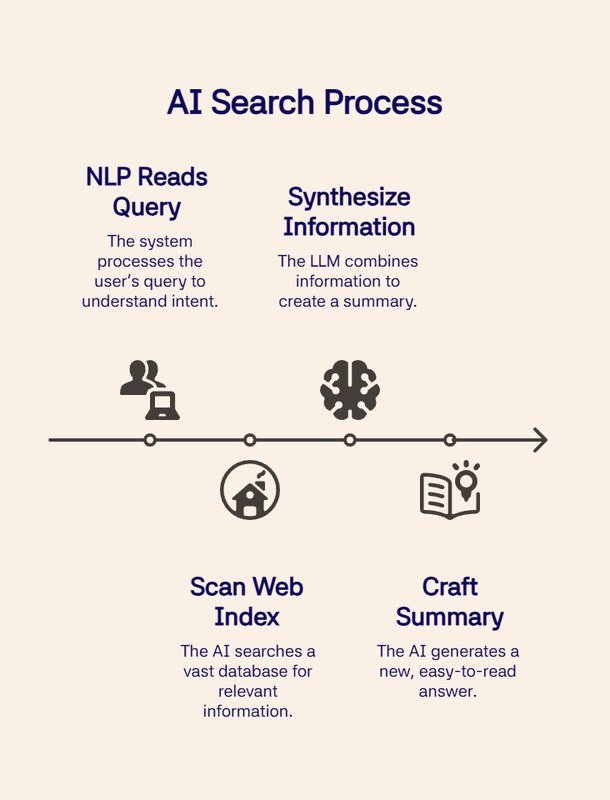
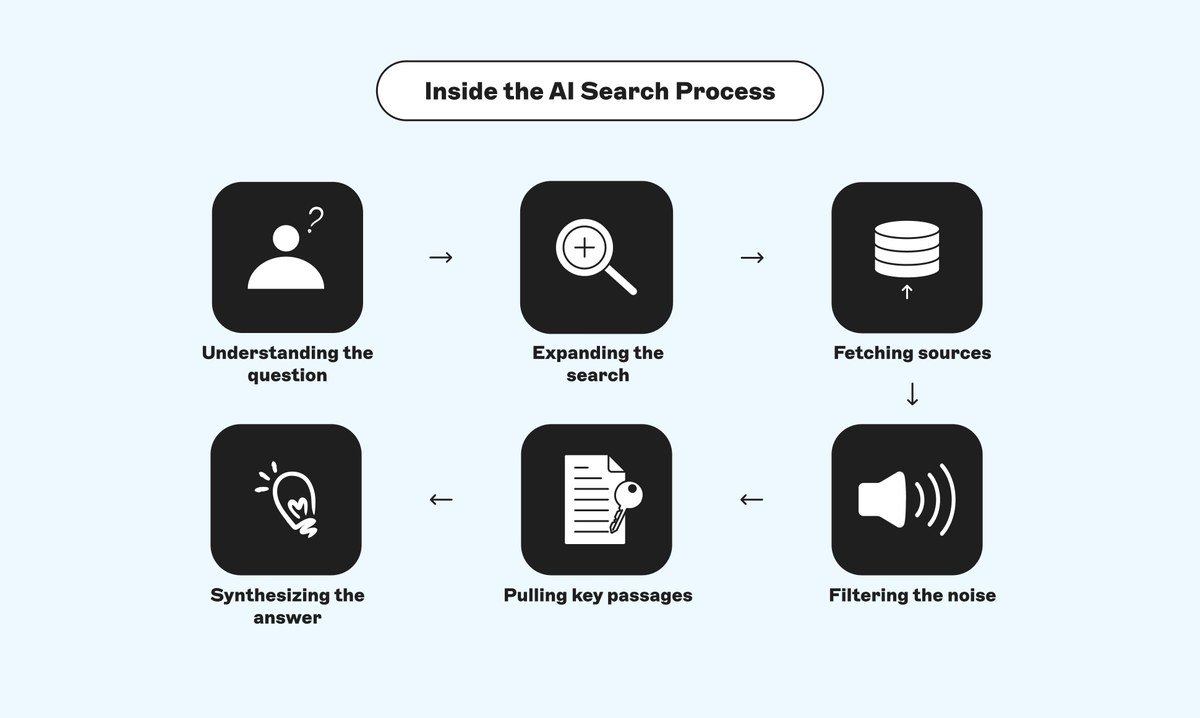
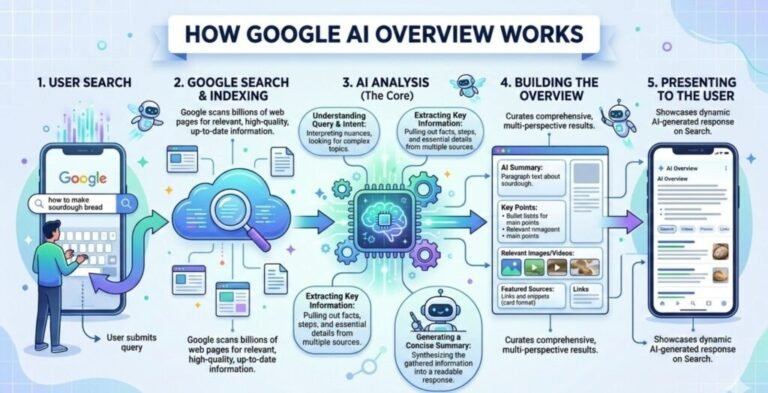
Flowchart showing how AI search engines process queries and rank results.
AI search systems are not a single piece of software. They combine several technologies in a pipeline: a language model to understand and generate text, a retrieval system to find relevant sources, and an indexing layer that keeps the model connected to current information.
The Role of Large Language Models (LLMs)
Large language models are the brain of AI search. Trained on enormous amounts of text, they learn patterns in language that let them understand questions, summarize documents, and generate coherent responses. When you type a question, the model interprets its meaning — including synonyms, implied context, and intent — rather than just matching keywords.
LLMs have a well-known flaw: they can confidently produce information that sounds plausible but is wrong. This is called hallucination. That is why AI search systems do not rely on the model alone; they pair it with a retrieval step that grounds the answer in actual sources.
Retrieval-Augmented Generation (RAG) and Indexing
Retrieval-Augmented Generation, or RAG, is the architecture most AI search tools use to keep answers accurate and current. Before the model writes an answer, the system searches an index of web pages, articles, and databases, retrieves the most relevant passages, and feeds them to the model as context. The model then composes an answer based on those passages rather than on its training memory alone.
This matters for two reasons. First, it lets the system access information published after the model was trained. Second, it gives the system a basis for citations — the sources actually used to generate the answer. The quality of an AI search tool depends heavily on the freshness of its index and on how well its retrieval step ranks relevant passages.
Not every AI search tool works the same way. Some run their own web crawlers and indexes, while others license third-party search indices or rely on a mix of live web retrieval and curated databases. This affects answer freshness, coverage, and the types of sources cited.
Query Understanding and Personalization
Before retrieving sources, an AI search system must understand what you are actually asking. This involves parsing the query, recognizing entities such as people, places, and products, detecting the intent behind the question, and considering context from earlier messages in the same conversation.
Many tools also add personalization. They may factor in your location, language, or past searches to tailor results. Some let you choose a focus mode, such as academic sources, news, or social discussions, which changes the retrieval pool before the model generates an answer. The trade-off is that personalization can narrow your results, so it is worth knowing what is influencing what you see.
What to Look For in an AI Search Tool
Not all AI search products are created equal. Three features have the biggest impact on answer quality and trustworthiness.
Source Transparency and Citations
A good AI search tool shows you where its answer came from. Look for inline citations, numbered references, or a source list that links to the original pages. If a tool gives you an answer with no way to trace it, treat that answer as unverified. Transparency is not just a convenience — it is the main safeguard against hallucination.
Real-Time Data Access
Some AI tools are trained on data that is months or years old and cannot see the web unless a separate browsing feature is enabled. Others retrieve live information for every query. If you need current news, prices, availability, or fast-changing facts, real-time access is essential. Check whether the tool indicates when its information was last updated.
Multimodal Search Capabilities
Modern AI search is increasingly multimodal, meaning it can process images, audio, and video in addition to text. You might upload a photo of a plant to identify it, photograph a part to find a match, or ask a question about a chart. If those use cases matter to you, look for a tool that explicitly supports image and file uploads rather than text-only queries.
Who Should Use AI Search? Use Cases for Every Audience
People use AI search on laptops and smartphones for different tasks.
AI search is not a one-size-fits-all replacement for everything. It excels at some tasks and struggles with others. Here is how different audiences can get the most value from it.
Students and Researchers
AI search is a powerful starting point for research. It can summarize a topic, explain a concept in simpler terms, compare viewpoints, and point you to primary sources. The key is to treat it as a research assistant, not a final authority. Use the citations to return to the original papers, articles, or reports, and verify any statistic or claim before including it in your own work.
Professionals and Businesses
For professionals, AI search saves time on tasks like drafting emails, summarizing long documents, analyzing competitors, and preparing briefings. Teams can use it to gather context before meetings or explore a new market. The caveat is confidentiality — avoid pasting sensitive business data into a public AI tool, and check the provider’s data-handling policy before using it with proprietary information.
Everyday Users
For everyday questions — recipe substitutions, product comparisons, travel planning, troubleshooting — AI search often delivers a faster, more complete answer than clicking through five links. It is especially useful for open-ended questions without a single correct answer. For local, real-time, or transactional needs like store hours, directions, or bookings, a traditional search or dedicated app is still often the better choice.
Key Benefits of AI Search Over Traditional Search
AI search offers several clear advantages that explain its rapid adoption. It provides faster answers by synthesizing information instead of making you read multiple pages. It handles complex, nuanced questions and follow-ups that keyword matching handles poorly. It aggregates multiple sources, which can surface perspectives you might not have found on your own. And it is more accessible — a plain-language answer is easier to use than a page of links for many people.
Use AI search for questions that begin with “explain,” “compare,” “summarize,” or “how do I.” Use traditional search for questions that begin with “where,” “when,” “who is open,” or “how much does it cost right now.” Matching the tool to the task gets you the best result.
Limitations and Common Mistakes to Avoid
AI search is impressive, but it is not infallible. Understanding its limitations is the difference between using it wisely and being misled by it.
Hallucinations and Accuracy Risks
The biggest risk is hallucination — the model generating a confident, coherent answer that is factually wrong. Even with retrieval grounding, errors slip through. The system may misread a source, combine information incorrectly, or fail to notice that a source is outdated or biased. Accuracy also varies by topic: well-documented subjects tend to produce reliable answers, while niche, new, or rapidly changing topics carry higher risk.
Never rely on an AI search answer alone for decisions involving health, legal matters, finances, or safety. Always confirm critical information through official sources, such as a doctor, attorney, government website, or the manufacturer’s own documentation.
Common Mistakes to Avoid
Several recurring mistakes lead to poor results from AI search. Vague questions produce vague answers, so be specific. Treating a single answer as the complete truth ignores the possibility of error. Asking about fast-changing topics like live prices or breaking news without checking data freshness can give you outdated information. And using AI search for local, transactional needs often works poorly compared with a dedicated map or booking app.
- Ask specific, detailed questions with context.
- Check the cited sources before trusting an answer.
- Use follow-up questions to refine the response.
- Verify time-sensitive facts against a current source.
- Accepting an answer with no citations at face value.
- Using AI search for live prices, store hours, or bookings.
- Pasting confidential or personal data into public tools.
- Treating one AI answer as the final word on a topic.
How to Fact-Check and Use AI Search Responsibly
Using AI search responsibly is a skill. A few habits will keep you from being misled.
Cross-Checking Sources
When an answer matters, open the cited sources and read them. Ask whether the source is authoritative for the claim, whether it is current, and whether the AI answer accurately represents what the source says. For important facts, find a second independent source. If the AI answer cites only one source, or none at all, treat it as a lead to investigate rather than a conclusion.
Understanding AI Limitations
Remember that AI search is a prediction engine, not a database of verified facts. It generates the most plausible answer based on the information it retrieved, which is not the same as the correct answer. The system has no awareness of what it does not know, so it will not tell you when it is guessing. That is why the responsibility for verification always stays with you.
Value and Final Recommendation: Is AI Search Worth It?
For most people, the answer is yes — with conditions. AI search is genuinely useful for learning, research, writing, and everyday questions. It saves time, handles complex queries well, and makes information more accessible. The conditions are that you choose a tool with transparent citations and real-time access, and that you verify anything that matters before acting on it.
As of 2026, AI search is no longer an experimental novelty; it is a standard feature in many tools people already use. The best approach is not to abandon traditional search entirely, but to use both — AI search when you need an explanation or synthesis, and traditional search when you need to go directly to a specific site or get live local information.
- AI search combines large language models with live web retrieval to generate direct, cited answers.
- RAG architecture keeps answers grounded in current sources and enables citations.
- Look for tools with source transparency, real-time data, and multimodal support.
- Verify important claims by reading the cited sources and cross-checking independently.
- Use AI search for explanations and synthesis; use traditional search for navigation and live local data.
Frequently Asked Questions


7 Comments