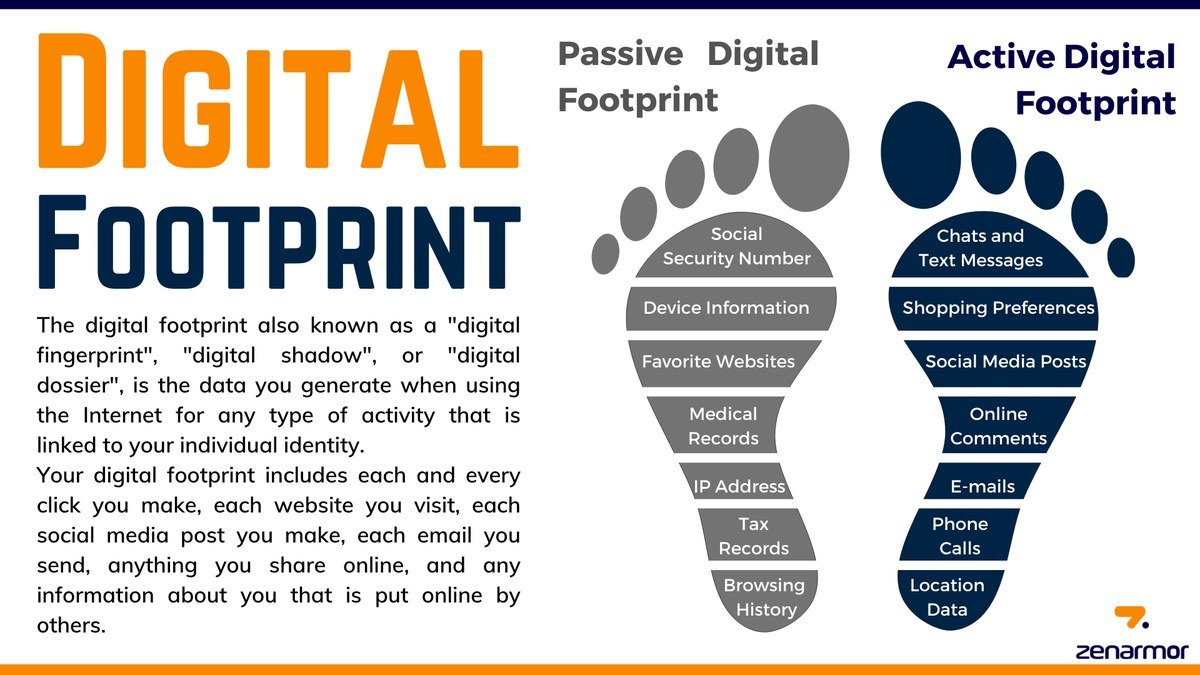
What Is Digital Footprint in Simple Words for Beginners
Your digital footprint is the trail of data you leave behind every time you go online, from posts and searches to information collected without you noticing. It builds up over time and can affect your privacy, reputation, and even job opportunities.
If you have ever wondered what is digital footprint in simple words, here is the shortest answer: it is the trail of data you leave behind every time you go online. Every website you visit, every post you like, every search you type, and even the apps running quietly in the background add another layer to that trail. Most of it builds up silently, and most beginners never notice it until something goes wrong — a job application gets rejected, an ad feels uncomfortably personal, or an old account gets hacked.
- Definition: A digital footprint is all the data you leave online, both on purpose and.
- Two types: Active footprints are things you share; passive footprints are collected behind the scenes.
- Real impact: Employers, colleges, advertisers, and scammers can all use your data.
- Quick check: You can review your footprint in about ten minutes by searching your name and.
- Manageable: You cannot erase everything, but simple habits keep your footprint smaller and safer.
What Is a Digital Footprint in Simple Words?
The Short Answer: Everything You Leave Behind Online
Think of your digital footprint like footprints on a beach. Every step you take leaves a mark, and the marks stay even after you walk away. Online, those marks are made of data: your name, your location, the links you click, the things you buy, the comments you write, and the videos you watch. Some of it you leave on purpose, and some of it gets collected without you ever pressing a button.
Your digital footprint is not one single file or record. It is scattered across social media platforms, search engines, shopping sites, apps, and the servers of companies you may not even remember visiting. Over time, those scattered pieces can be connected to form a surprisingly detailed picture of who you are, what you like, where you go, and what you might do next.
Why Beginners Should Understand This in 2026
In 2026, almost every part of daily life has an online component. People bank, shop, learn, work, date, and socialize through apps and websites, which means the average person generates far more data than they did even a few years ago. At the same time, AI tools and data analysis have made it easier for companies to sort through that data and draw conclusions from it.
You do not need to be a tech expert to understand your digital footprint. You just need to know what it is, where it comes from, and which simple habits keep it from growing out of control. That basic awareness is becoming as important as knowing how to spot a scam or how to create a strong password.
Active vs. Passive Digital Footprints: The Two Main Types
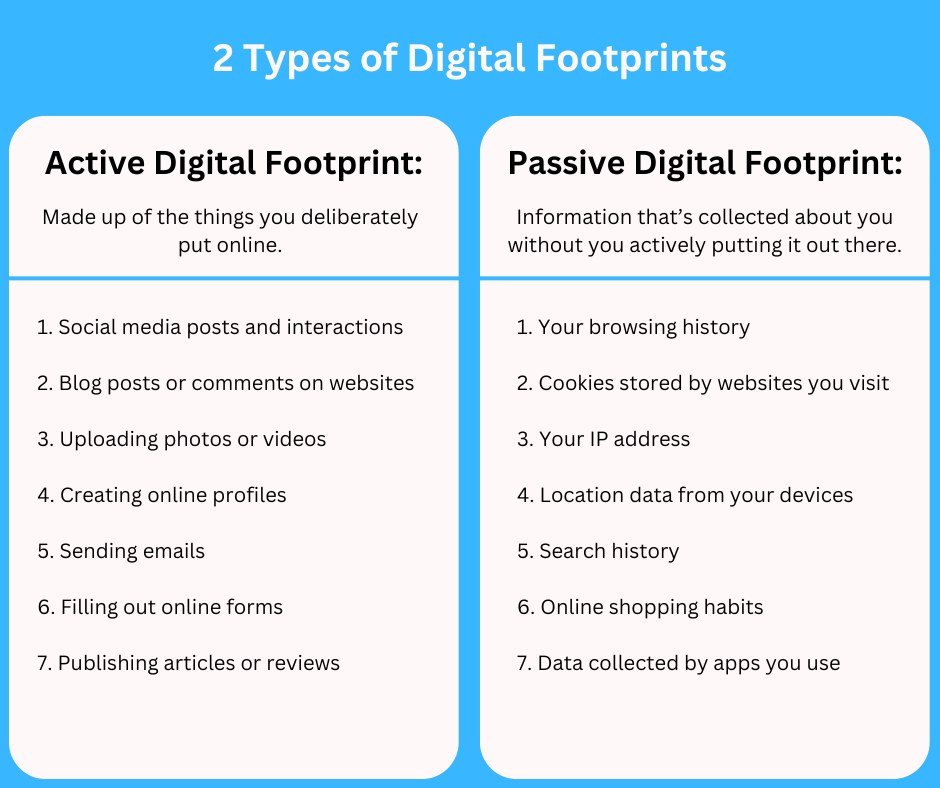
Chart comparing active and passive digital footprint examples.
Active Footprints: Posts, Comments, and Files You Choose to Share
An active digital footprint is anything you deliberately put online. That includes social media posts, photos, comments, reviews, blog articles, videos, and even the messages you send through public channels. When you upload a resume to a job site, fill out a profile on a dating app, or leave a review on a product page, you are actively adding to your footprint.
Active footprints are easier to understand because you made a conscious choice to share that information. What most people underestimate is how long that information stays visible. A post you made years ago can resurface in a search result, a screenshot, or a shared link long after you forgot it existed.
Passive Footprints: Data Collected Without You Clicking a Thing
A passive digital footprint is the data collected about you without any obvious action on your part. Websites record your IP address, your device type, your approximate location, how long you stayed on a page, and which elements you interacted with. Apps track when you open them, how often you use them, and what you do inside them. All of this happens quietly in the background.
Passive data collection is not always harmful, but it is almost always happening. Even a simple visit to a news article can generate dozens of data points about your device, browser, and reading habits before you scroll to the end of the page.
What Actually Makes Up a Digital Footprint?
Social Media Activity, Search History, and Online Purchases
Your social media activity is the most visible part of your footprint. Posts, likes, shares, profile details, and even the people you follow all contribute. Search engines add another layer: every query you type becomes part of your search history, and many search engines link that history to your account or device. Modern AI search tools go further by analyzing your past queries to personalize results — you can learn more in our guide to what is AI search and how it works.
Online purchases leave a particularly detailed trail. Shopping sites store your name, address, payment method, order history, and often your browsing behavior on their site. If you check out as a guest, the store still records your IP address and device information. If you create an account, the trail becomes even longer.
Cookies, Trackers, Device Info, and Location Data
Cookies are small files that websites place in your browser to remember you. Some are useful — they keep you logged in and remember what is in your shopping cart. Others are used by advertising networks to track you across multiple sites and build a profile of your interests.
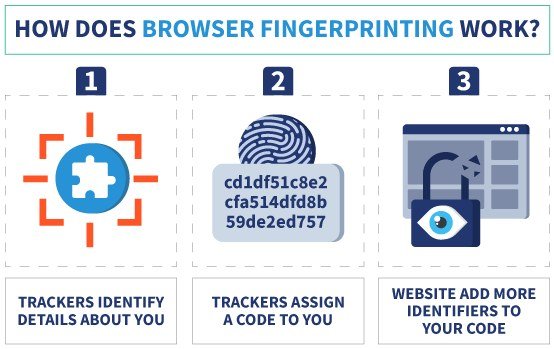
Trackers go beyond cookies. They can include pixels embedded in emails, fingerprinting scripts that identify your device by its unique combination of settings, and location services that record where you are when you use an app. Your device itself contributes information too, such as your operating system, screen resolution, language, and battery level. AI chatbots and assistants add another layer, since they store the conversations you have with them; if you use tools like ChatGPT, our breakdown of what data does ChatGPT collect explains what gets saved.
A single webpage can contain trackers from dozens of different companies, many of which you have never heard of. Those companies can connect your visits across thousands of sites to build a detailed advertising profile.
Why Your Digital Footprint Matters More Than You Think<

A digital footprint is the trail of online activities like searches and posts.
A digital footprint is the trail of online activities like searches and posts.
How Employers, Colleges, and Companies Use Your Data
Many employers, colleges, and scholarship committees search for candidates online before making decisions. A public post, an old photo, or a heated comment thread can shape how they see you, even if it does not reflect who you are today. This is not limited to formal background checks; a simple search of your name can surface content you forgot you shared.
Companies also use your footprint for marketing and risk assessment. Insurers, landlords, and lenders in some regions look at data patterns to inform decisions, and advertisers use your browsing history to decide which ads to show you. You may not be able to control every use of your data, but knowing what is visible gives you a chance to manage the parts you can.
The Hidden Value of Your Personal Information
Your personal information has real financial value. Data brokers collect, combine, and sell details about people to advertisers, researchers, and other buyers. Your email address, phone number, shopping habits, location history, and even your estimated income can end up in databases you never agreed to join.
That is why so many websites ask you to create accounts and accept cookies: the data you generate is a product. Understanding this does not mean you should never share anything online, but it does mean you should treat your personal information like something valuable — because to many companies, that is exactly what it is. A larger footprint also gives scammers more material for phishing attacks, where fake messages are personalized with real details about your life to make them look convincing.
Common Mistakes That Accidentally Grow Your Digital Footprint
Oversharing Personal Details and Accepting Every Cookie
The most common mistake is oversharing without thinking about who can see it. Posting your full birth date, home address, travel plans, or children’s school details makes that information available to anyone, including people with bad intentions. Even seemingly harmless posts, like a photo of a boarding pass or a new house key, can reveal more than intended.
Accepting every cookie banner without reading it is another habit that quietly expands your footprint. Many sites offer a “reject non-essential” option, but the default button is usually “accept all.” Taking two extra seconds to choose the more private option makes a real difference over time.
Ignoring Privacy Settings, Permissions, and Old Accounts
Most social platforms have privacy settings that let you control who sees your posts, but those settings are often set to the least private option by default. Many people create an account, never touch the settings, and assume their content is visible only to friends. It usually is not.
Old accounts are another blind spot. That forum you joined a decade ago, that app you downloaded once, and that newsletter you signed up for years ago may still hold your data. If you never deleted them, they are still part of your footprint — and some of them may have been involved in data breaches without you ever knowing.
- Check the privacy settings on every account you actually use
- Delete or deactivate accounts you no longer need
- Use a temporary email address for one-time signups
- Posting your full birth date, home address, or travel plans publicly
- Clicking “accept all” on every cookie banner without looking
- Giving apps access to your location, contacts, or camera when they do not need it
How to Check Your Digital Footprint in About 10 Minutes
Searching Your Own Name the Way Others See It
The fastest way to see your footprint is to search for your own name the way a stranger would. Use a search engine and type your full name in quotation marks, then browse the results. Try adding your city or your profession to see what else comes up. Do the same on social media platforms, since search engines do not index everything.
This gives you a snapshot of the most visible parts of your footprint. You may be surprised by what you find: an old social profile, a comment on a public forum, a photo someone else tagged you in, or a listing on a people-search website.
Reviewing Social Media Privacy Settings and Connected Apps
Next, open the privacy settings on the social platforms you actually use. Look for options that control who can see your posts, who can find you in searches, and whether your profile appears in search engines. Most platforms also have a section that lists the third-party apps connected to your account; revoke access to anything you no longer use.
Type “your full name” into a search engine and scan the first few pages of results.
Search your name on each social network you use, including ones you joined years ago.
Set your profiles to the most private option that still works for how you use them.
Remove third-party apps that have access to your social accounts.
How to Reduce and Manage Your Digital Footprint
Simple Cleaning Habits That Actually Help
You do not need to go offline to shrink your footprint. Small habits, done consistently, make the biggest difference. Start by deleting old accounts you no longer use, removing yourself from mailing lists you never read, and clearing out old posts that no longer represent you.
Before you share something new, ask yourself three questions: Would I be comfortable if a stranger saw this? Would I be comfortable if my employer saw this? Would I be comfortable if this existed online in ten years? If the answer to any of them is no, do not post it.
Privacy Tools and Settings Worth Using in 2026
Several practical tools can help you manage your footprint without any technical skill. A password manager lets you use a unique password for every account, which limits the damage if one site is breached. A privacy-focused browser or search engine reduces the amount of data collected during routine browsing. Two-factor authentication adds a layer of protection to your most important accounts.
Also, check the data and privacy sections of the platforms you use. Most major platforms now offer ways to download your data, delete your account, or adjust ad personalization. Some data broker sites allow you to opt out of their databases, though the process varies and new listings can reappear over time.
Set a reminder to review your privacy settings twice a year. Platforms change their defaults regularly, and a quick ten-minute check keeps your footprint from growing quietly in the background.
Final Takeaway: Should You Try to Erase Your Digital Footprint?
Practical Advice for Beginners, Not Tech Experts
Completely erasing your digital footprint is not realistic for most people. If you use the internet at all — for banking, work, school, or staying in touch with family — you will leave some trace. The goal is not perfection; it is control. You want the footprint you leave to be the one you chose, not the one that accumulated by accident.
Focus on the areas that matter most to you. If you are job hunting, clean up your public profiles. If you are worried about data breaches, use unique passwords and two-factor authentication. If you simply want more privacy, adjust your settings and share less. Every small change reduces your exposure.
Your First Step Toward a Cleaner Digital Life
Your first step is simple: do the ten-minute check described above. Search your name, review your settings, and disconnect the apps you no longer use. That single session will show you exactly where your footprint stands and give you a clear list of what to clean up next.
- Your digital footprint is the data trail you leave online, both actively and passively.
- It includes social posts, search history, purchases, cookies, trackers, and location data.
- Employers, colleges, advertisers, and scammers can all use it.
- You can check yours in about ten minutes by searching your name and reviewing settings.
- You cannot erase it completely, but you can manage it with simple habits.
Frequently Asked Questions




One Comment