What Is Voice Search and How Does It Work A Simple Guide
Voice search lets you search the web, apps, and devices by speaking instead of typing. It works through speech recognition, natural language processing, and search algorithms that deliver a spoken or on-screen answer.
To understand what is voice search and how does it work, start with a familiar moment: you ask your phone a question, and an answer appears within seconds. If you have ever asked a smart speaker for the weather, dictated a text while driving, or searched for a nearby restaurant without typing, you have already used voice search — and you have probably felt both its convenience and its occasional frustration.
- Definition: Voice search converts spoken words into a search query and delivers an answer aloud.
- How it works: Speech recognition turns sound into text, NLP understands intent, and search algorithms rank the.
- Best devices: Smart speakers, smartphones, wearables, earbuds, cars, and smart TVs all support voice search.
- Main benefits: Speed, hands-free convenience, and accessibility for users with mobility or vision challenges.
- Key limitations: Background noise, privacy concerns, and weak handling of complex or vague queries.
What Is Voice Search?
Voice search is a technology that lets you search the internet, apps, or your device using spoken words instead of typed text. You speak a question or command, and the device converts your speech into a search query, finds an answer, and reads it back or displays it on screen.
Voice search is not a single product. It is a feature built into smartphones, smart speakers, laptops, cars, and even TVs. The goal is always the same: make searching faster and more natural by letting people use their voice.
Voice Search vs. Voice Assistants: What’s the Difference?
People often use the two terms interchangeably, but they are not the same thing. A voice assistant is the software “personality” that listens and responds — think Siri, Google Assistant, or Alexa. Voice search is one of the things that assistant can do.
A voice assistant can also set alarms, control smart home devices, send messages, and manage calendars. Voice search specifically refers to the act of asking a question or giving a search command, like “What is the capital of France?” or “Find coffee shops near me.” In short, the assistant is the tool; voice search is one of its core functions.
How Does Voice Search Work? The Technology Explained
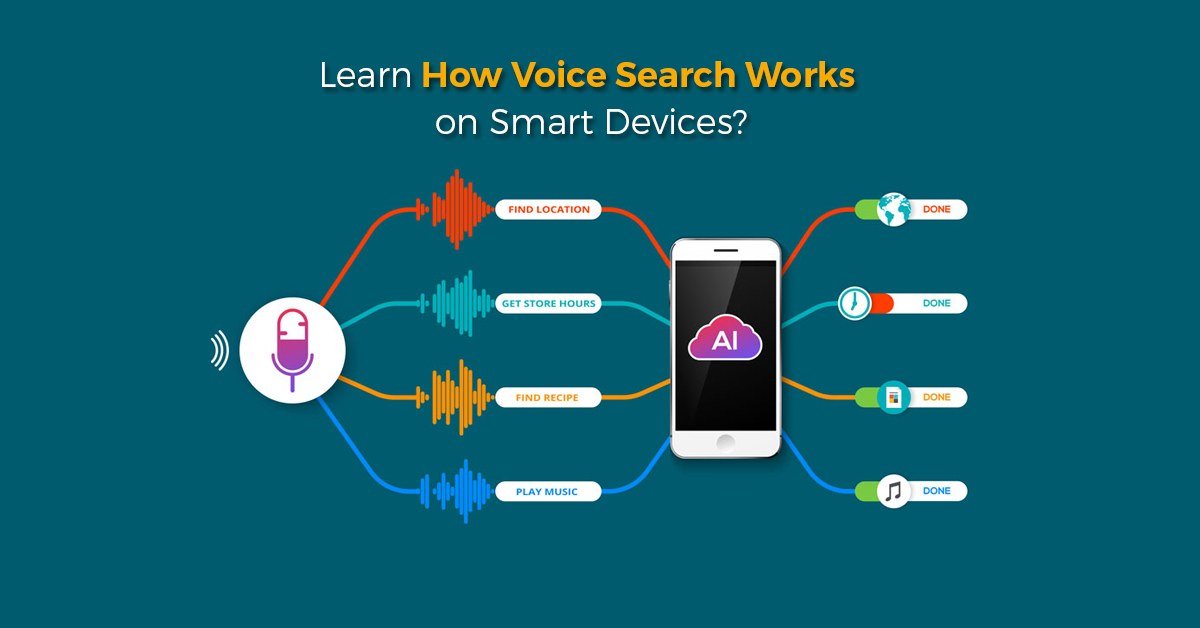
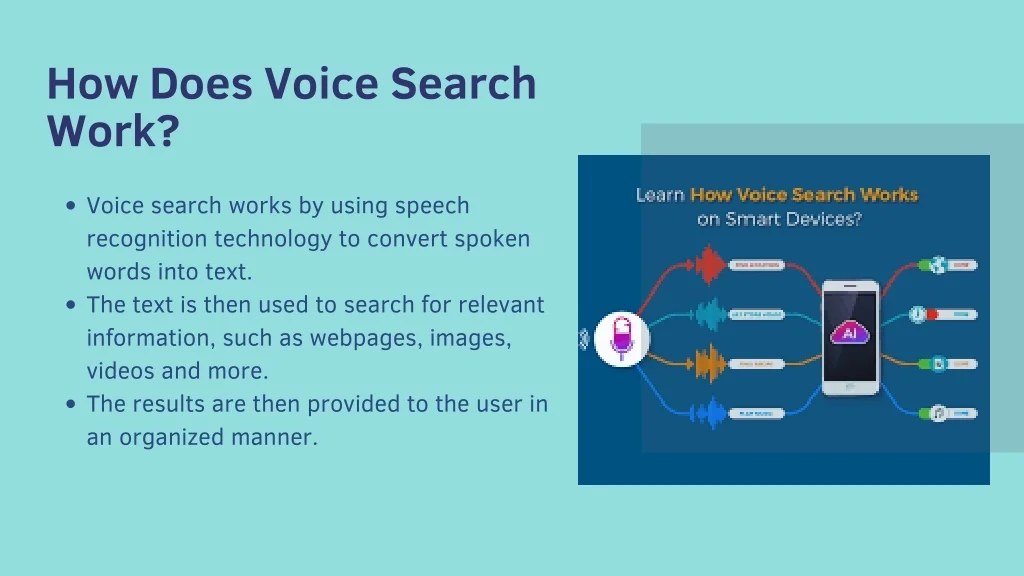
Diagram showing how a voice search query travels from user to server and back.
Voice search looks simple, but several layers of AI technology work together in a fraction of a second to deliver an answer. Here is what happens between the moment you speak and the moment you get a response.
Step 1: Speech Recognition — Turning Sound into Text
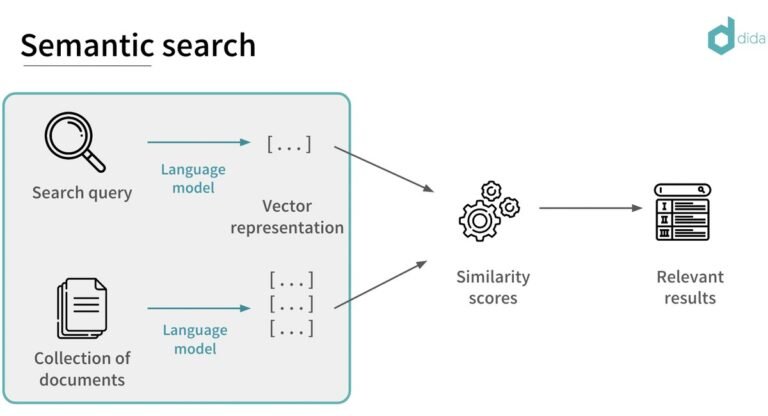
The first step is speech recognition, also called speech-to-text. The microphone on your device captures your voice and converts the audio into a digital signal. Software then analyzes the sound waves, breaks them into small units called phonemes, and matches them against a massive database of words to produce a text transcript.
Modern speech recognition uses deep learning models trained on massive amounts of recorded speech. These models handle different accents, speaking speeds, and background noise far better than early systems. The result is a written version of what you said, usually produced in under a second.
Step 2: Natural Language Processing — Understanding Intent
Turning sound into text is only half the job. The device now needs to understand what those words actually mean. This is where natural language processing (NLP) comes in. NLP is the branch of AI that helps computers interpret human language, including grammar, context, and intent. If you want a deeper look, our guide to what is natural language processing covers the core concepts in plain English.
For example, the query “What’s the weather like today?” is not asking for a definition of the word “weather.” The system must recognize that you want a local forecast, identify your location, and understand that “today” means the current date. NLP handles all of that interpretation before the search even begins.
Voice assistants use “wake word detection” to stay quiet until they hear a trigger phrase like “Hey Siri” or “OK Google.” The audio is processed locally on the device until that wake word is detected.
Step 3: Search Algorithms and Personalization — Delivering the Answer
Once the system understands your intent, it sends the query to a search engine or a built-in knowledge base. Search algorithms then rank the most relevant results, often pulling from local listings, web pages, and structured data. Modern search engines are built around understanding user intent, and voice queries make that intent much more explicit than typed keywords. Our article on how search engines understand user intent explains this shift in more detail.
Personalization also plays a role. The device may consider your location, search history, and past preferences to refine the answer. That is why asking “Where is the nearest pharmacy?” from home and from a hotel room can produce different results, even on the same phone.
Where Voice Search Works Best: Devices and Everyday Scenarios
Voice search is not limited to one type of gadget. It has spread across the devices people use every day, and each one creates a slightly different experience.
Smart Speakers and Smart Displays
Smart speakers like Amazon Echo, Google Nest, and Apple HomePod are designed around voice interaction. They work best for quick questions, music playback, timers, and smart home controls. Smart displays add a screen, so you can see recipes, maps, or weather forecasts while the assistant speaks the answer aloud.
Voice assistant features vary by brand, model, and region. A command that works on one smart speaker may not be available on another, so check the manufacturer’s official feature list before assuming a specific function exists.
Smartphones, Wearables, and Earbuds
Smartphones remain the most common way people use voice search, whether through the assistant app, the search bar’s microphone icon, or hands-free activation. Wearables like smartwatches and fitness trackers let you send quick messages or start a workout without pulling out your phone. Wireless earbuds with built-in assistants make voice search useful while walking, commuting, or cooking.
In-Car and TV Voice Search
Car systems increasingly support voice commands for navigation, calls, and music, which helps drivers keep their hands on the wheel and eyes on the road. Smart TVs and streaming devices also use voice search to find shows, adjust volume, and switch inputs. The experience is usually simpler than on a phone, but it works well for the limited set of commands those systems understand.
Who Should Use Voice Search — and Who Shouldn’t<

A person using voice search on a smartphone at home.
A person using voice search on a smartphone at home.
Voice search is a tool, not a replacement for typing. Understanding who benefits most — and when typing is still better — helps you decide how much to rely on it.
Ideal Users and Best Use Cases
Voice search is ideal for anyone who is moving, has their hands full, or needs a fast answer. Parents cooking dinner, drivers navigating to a destination, people with visual impairments, and older adults who find small screens difficult are all strong candidates. It also works well for simple, conversational queries like “What time does the post office close?” or “Play the latest news.”
- Hands-free and much faster for simple questions
- Natural for conversational queries and follow-ups
- Accessible for people with mobility or vision challenges
- Less accurate in noisy environments or with strong accents
- Weak for complex, multi-part, or highly specific queries
- Privacy concerns from voice recordings and data collection
When Typing Is Still the Better Option
Typing remains better for long or complex searches, such as comparing product specifications, researching a topic with multiple sources, or entering URLs, passwords, and numbers. Voice input can also struggle with unusual names, technical terms, and words that sound alike. If you need precision or want to review your search history carefully, typing gives you more control.
Key Benefits of Voice Search
Beyond the convenience factor, voice search offers real advantages that make it valuable for a wide range of users.
Speed, Convenience, and Hands-Free Multitasking
Speaking a query is usually faster than typing it, especially on a phone. Voice search also allows multitasking: you can ask for a recipe while chopping vegetables, get traffic updates while putting on shoes, or add items to a shopping list while carrying groceries. The hands-free nature of voice search is its biggest practical win.
Accessibility and Inclusivity for All Users
Voice search is a meaningful accessibility tool. People with limited mobility, vision impairments, dyslexia, or conditions that make typing painful can use their voice to access the same information as everyone else. It also helps older users who are not comfortable with keyboards or small touchscreens. In this sense, voice search is not just convenient — it is empowering.
Limitations and Common Mistakes to Avoid
Voice search has improved dramatically, but it is not flawless. Knowing its limitations helps you avoid frustration.
Accuracy Issues and Background Noise
Speech recognition struggles with loud environments, heavy accents, and overlapping voices. A noisy kitchen or a windy street can cause the system to mishear words. Many devices improve over time as they learn your voice, but accuracy is never guaranteed.
Privacy and Data Collection Concerns
Voice search requires microphones to be active, which raises legitimate privacy questions. Recordings may be stored in the cloud, reviewed by human annotators, or used to improve AI models. If privacy is a concern, check the privacy settings on your device and review what voice history is being saved.
Voice recordings can contain sensitive personal information. Before using voice search for private topics, review your device’s voice history settings and consider deleting stored recordings regularly.
Vague Commands and Mispronunciations
Voice search works best with clear, specific commands. Saying “find a restaurant” without location context forces the system to guess. Mispronounced names, unusual spellings, and words with multiple pronunciations can also confuse the assistant. The more precise your phrasing, the better the result.
How to Get Better Voice Search Results: Practical Tips
You do not need to be a tech expert to improve your voice search results. A few small habits make a big difference.
Speak Naturally but Stay Specific
Voice assistants are designed for conversational language, so speak the way you normally would. But add enough detail to avoid ambiguity. Instead of “weather,” say “What is the weather forecast for Chicago this weekend?” The extra context helps the system narrow down the answer.
Use Follow-Up Questions and Context Clues
Many assistants support follow-up questions within the same conversation. After asking “What time does the museum close?”, you can simply ask “What about tomorrow?” and the system understands you are still talking about the museum. Using this feature saves time and reduces the need to repeat context.
If a voice search returns the wrong result, rephrase the question with more specific details, such as a city name, a date, or a category. For example, change “best pasta” to “best Italian restaurant in downtown Austin.”
Manage Privacy Settings and Voice History
Most voice assistants let you review, pause, or delete voice recordings. Take a few minutes to explore these settings. You can usually turn off voice history storage, set auto-delete intervals, or review what has been recorded. This gives you control without giving up the convenience of voice search.
The Future of Voice Search in 2026 and Beyond
Voice search continues to evolve as AI models become more capable, reshaping how people interact with information.
Voice Commerce and Local Search Growth
Voice commerce — ordering products, booking services, and making payments by voice — is growing as trust in voice assistants increases. Local search is also a major focus, since many voice queries are location-based. Asking “Where can I get a haircut nearby?” often triggers local results, making voice search important for small businesses and everyday consumers alike.
AI Integration and Multimodal Search Experiences
Voice search is increasingly combined with other AI technologies. Multimodal systems can understand voice, text, and images together, so you might ask a question about a photo on your screen and get an answer that references both. Voice search is also part of the broader shift in how AI changes the way people search online, moving from typed keywords to conversational, multi-turn interactions. As AI assistants become more integrated into daily life, voice search will likely feel less like a separate feature and more like a natural way to interact with technology.
Final Recommendation: Is Voice Search Worth Using?
Voice search is worth using for the right tasks. It is fast, hands-free, and accessible, making it ideal for quick questions, local searches, and multitasking. It is less useful for complex research, precise data entry, or private topics.
The best approach is to use voice search where it shines and switch to typing when you need precision. Experiment with your own device, learn what commands work well, and adjust your privacy settings to match your comfort level.
- Voice search converts spoken words into text, understands intent with NLP, and delivers answers through search algorithms.
- It works best on smart speakers, smartphones, wearables, and in-car systems for quick, hands-free questions.
- Benefits include speed, convenience, and accessibility; limitations include accuracy issues, privacy concerns, and weak handling of complex queries.
- Speak naturally but specifically, use follow-up questions, and manage your voice history for better results.
Frequently Asked Questions