
How AI Assistants Are Changing Daily Life for Good
AI assistants have evolved from voice search tools into proactive home automation hubs that manage schedules, control smart devices, and save time through routines. They are worth adopting when set up deliberately, with attention to privacy and gradual integration.
Few technologies have moved from novelty to necessity as quickly as voice and AI assistants, and understanding how ai assistants are changing daily life helps you decide which ones deserve a place in your home. What began as simple voice search has grown into a layer of automation that manages calendars, controls lighting, filters calls, and anticipates needs before you ask.
- Proactive by default: Modern assistants in 2026 anticipate needs rather than just answering commands.
- Ecosystem matters: Choose an assistant that supports the smart home devices you already own.
- Privacy needs setup: Review voice history, microphone mute, and data deletion settings early.
- Start small: One device and a few routines beat full home automation on day one.
- Placement affects trust: Kitchen and living room work well; bedrooms raise privacy questions.
The Short Answer: How AI Assistants Are Changing Daily Life in 2026
By 2026, the most useful AI assistants are no longer just answering questions. They coordinate morning routines, summarize unread messages, reorder household supplies, and flag schedule conflicts. The biggest shift is from reactive to proactive: instead of waiting for a command, modern assistants learn patterns and offer help before you ask.
That convenience comes with trade-offs around microphone access, data storage, and how much automation you actually want. The rest of this guide covers what to look for, who benefits most, the real limitations, and how to set up an assistant without overcomplicating your home. For a broader look at the technology behind these tools, explore how ai is changing everyday life in ways that go beyond voice commands.
What to Look For in an AI Assistant Today

A smartphone screen showing an AI assistant interface with voice and text input options.
Choosing an assistant in 2026 means looking beyond brand names. The right choice depends on the devices you already own, the tasks you want automated, and how much control you want over your data.
Core Capabilities and Ecosystem Compatibility
Start with the basics: how well does the assistant understand natural speech, handle follow-up questions, and complete multi-step tasks? A capable assistant should handle a request like “Add milk to the shopping list and remind me to pick it up tomorrow at 5” without breaking it into separate commands.
Ecosystem compatibility matters just as much. Amazon Alexa, Google Assistant, and Apple Siri each work best with their own device families. If your home already has smart lights, a thermostat, and a doorbell, check which assistant supports those brands before committing. Mixing ecosystems can work, but it often means juggling multiple apps and routines.
- Check which smart home devices you own and confirm they support the assistant you’re considering
- Test the assistant’s ability to handle multi-step requests before buying
- Review privacy settings and data deletion options before setup
- Decide between a speaker, display, or wearable based on where you’ll use it most
Privacy, Data Controls, and Transparency
Privacy is where assistants differ the most. Some devices process voice requests locally and send only selected data to the cloud, while others rely on cloud processing for almost everything. Look for physical microphone mute switches, clear voice history controls, and the ability to delete recordings on a schedule.
Transparency matters too. If a manufacturer’s privacy policy feels vague about what gets stored or who has access, that is a legitimate reason to keep looking. For a deeper look, our guide on how to protect privacy when using AI tools covers the settings worth changing first.
Privacy features vary by model, not just by brand. A budget smart speaker may lack the local processing and mute controls found on a premium model. Confirm the specific model’s specs before purchasing.
Hardware Options: Smart Speakers, Displays, and Wearables
The form factor shapes how you actually use the assistant. Smart speakers are the most affordable entry point and work well for kitchen timers, music, and quick questions. Smart displays add visual context: video calls, recipe steps, security camera feeds, and calendar widgets. Wearables like smartwatches and earbuds put the assistant on your wrist or in your ear when your hands are full.
There is no single best format. Many households end up with a speaker in the kitchen, a display in the living room, and a wearable for on-the-go needs. Start with one device, learn how you actually use it, and expand only when a second location clearly earns its place.
Who Benefits Most From AI Assistants
AI assistants are not one-size-fits-all, but certain groups consistently get more value from them than others.
Busy Professionals and Parents
For people juggling work calendars, school pickup times, and household tasks, the assistant acts as a second brain. Morning routines can pull together weather, commute time, and the day’s first meeting into a single briefing. Parents often rely on timers, shopping lists, and reminders to manage family life.
The key is that the assistant saves time only when set up properly. A routine that turns off lights, locks the door, and plays white noise at bedtime saves minutes every night. Without that setup, the assistant is just another gadget that answers trivia questions.
Older Adults and Users With Accessibility Needs
Voice control is genuinely transformative for people who have difficulty with screens, typing, or fine motor control. Assistants can read messages aloud, make calls hands-free, set medication reminders, and control lights without getting up. For older adults living independently, these capabilities reduce daily friction and support aging in place.
Some assistants also support accessibility features like slower speech responses, larger text on displays, and hearing aid compatibility. If you are choosing an assistant for someone with specific needs, test those features before buying rather than assuming they exist on every model.
The Biggest Everyday Benefits<
A hand holding a smartphone showing an AI assistant with weather and schedule updates.
A hand holding a smartphone showing an AI assistant with weather and schedule updates.
The real value of an AI assistant shows up in small, repeated moments throughout the day. Over weeks and months, those moments add up to meaningful time savings.
Time Savings Through Automation and Routines
Routines are the single most useful feature of modern assistants. A single phrase like “Good morning” can trigger a sequence: lights brighten, coffee maker starts, news plays, and your calendar is read aloud. Setting up these sequences takes time once, then saves time every day.
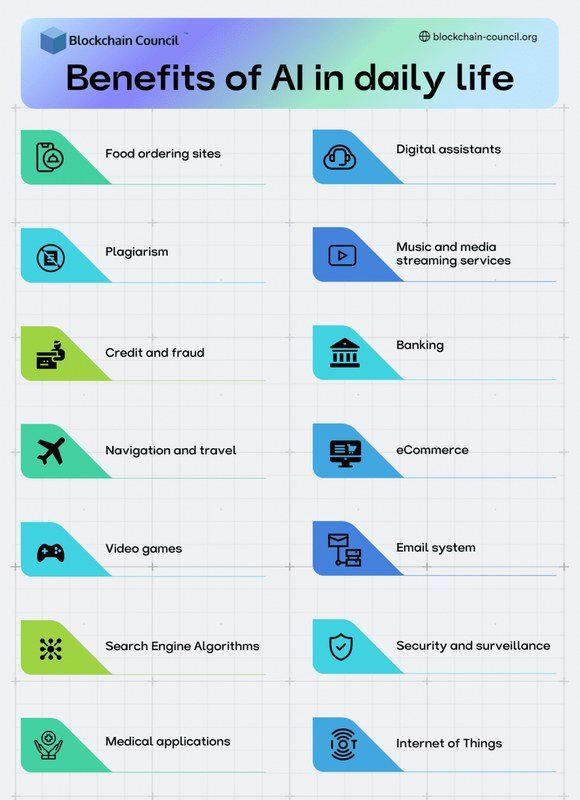
Automation extends beyond the home too. Many assistants integrate with email, messaging, and productivity apps. You can ask for a summary of unread emails, create calendar events from a voice note, or send a text without picking up your phone. This is a practical example of what AI automation in simple words really means: turning repeated manual steps into one command.
Proactive Assistance and Smart Home Integration
The most advanced assistants in 2026 are proactive. They notice patterns: you always start the dishwasher after dinner, or you leave for work at 8:15. Instead of waiting for a command, they offer suggestions or adjust settings automatically.
Smart home integration is where this becomes tangible. An assistant connected to your thermostat, lights, locks, and cameras can adjust the temperature when you leave, dim the lights when you start a movie, and show the front door camera on a display when someone rings. The convenience is real, but it depends on owning compatible devices and taking time to connect them.
Start with one routine that solves a real daily annoyance, such as a bedtime sequence that locks doors and turns off lights. Once that routine becomes habit, add one more. Gradual adoption is far more sustainable than trying to automate everything at once.
Limitations and Drawbacks to Keep in Mind
For all the convenience, AI assistants come with real limitations worth understanding before you build your home around them.
Privacy and Data Security Concerns
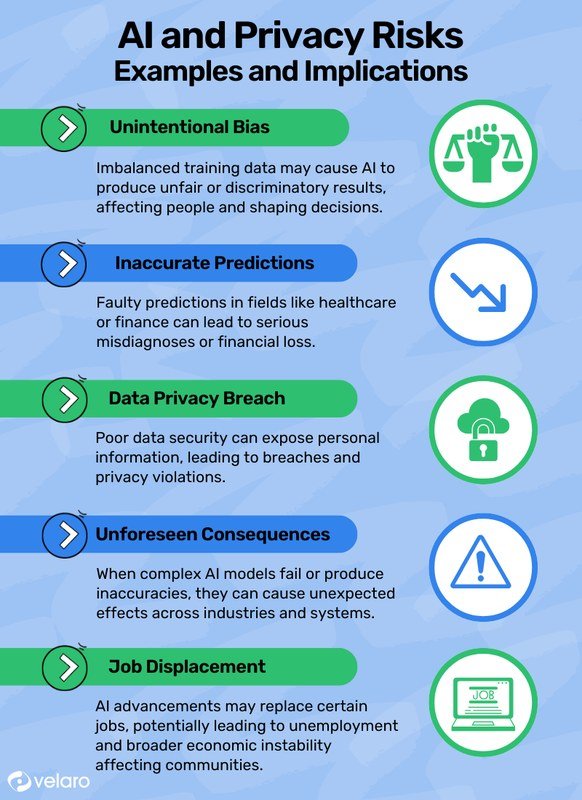
The most common concern is that a microphone-equipped device is always listening. In practice, most assistants use wake-word detection that processes audio locally until the wake word is heard, but the microphone is technically always on. That distinction matters little to people who feel uncomfortable with any always-listening device in their home.
Data storage is the bigger issue. Voice recordings, search history, and location data can be stored in the cloud, and retention policies vary by company. If you share a home with other people, especially children, you need to understand what data is collected and how to delete it. For practical guidance, our article on how to stay safe from AI scams explains how to spot fraudulent voice messages and phishing attempts that misuse assistant technology.
- Hands-free control of music, timers, calls, and smart home devices
- Time-saving routines and proactive reminders that compound over time
- Accessibility benefits for older adults and users with mobility or vision limitations
- Microphone-equipped devices raise privacy concerns that require active management
- Misunderstandings and accuracy gaps still occur, especially with accents and complex requests
- Smart home integrations depend on compatible devices and ongoing maintenance
Accuracy Gaps and Contextual Misunderstandings
No assistant understands everything. Background noise, strong accents, homophones, and vague requests can all lead to wrong answers or unwanted actions. A request like “Play something for the kids” might be interpreted differently than intended, and “Set the timer for 10 minutes” could become a calendar event if the assistant mishears.
These errors are usually minor annoyances, but they matter more when the assistant controls physical devices. A misunderstood command could unlock a door, change the thermostat, or trigger a purchase. Most assistants have confirmation settings for high-stakes actions, and it is worth enabling them.
Common Mistakes to Avoid When Adopting AI Assistants
Most people who abandon their AI assistant do not fail because the technology is bad. They fail because of how they set it up.
Over-Integrating Too Quickly
Buying an assistant and immediately connecting every smart device in your home is a recipe for frustration. When something breaks, you have no idea whether the problem is the assistant, the device, the Wi-Fi, or the integration. Start small: connect one or two devices, learn how the assistant handles them, and expand gradually.
The same applies to routines. Creating ten routines on day one means maintaining ten routines when something changes. Start with two or three that genuinely improve your day.
Ignoring Privacy Settings and Permission Prompts
The default settings on most assistants lean toward convenience, not privacy. Voice history may be stored indefinitely, personalized ads may be enabled, and location data may be shared with third-party skills or actions. Skipping the setup review means accepting all of those defaults.
Take time to review permissions during setup and again after software updates. Many companies change their privacy options over time, and an assistant configured carefully a year ago may have different settings today. Our guide on protecting privacy when using AI tools walks through the specific settings worth checking.
- Review privacy settings during setup and after major software updates
- Start with one device and a small number of routines
- Enable confirmation prompts for purchases, locks, and other high-stakes actions
- Connecting every smart device on the first day
- Leaving default privacy settings untouched
- Placing an assistant in a bedroom if you are uncomfortable with an always-listening microphone there
Where to Place AI Assistants for Best Results
Placement affects both usefulness and privacy. The right location depends on how you plan to use the assistant and who else shares your space.
Living Room and Kitchen Placement
The kitchen is the most popular spot for a smart speaker because it is where timers, recipes, music, and shopping lists come together. A speaker on the counter can be heard over cooking noise, and a display can show recipe steps or video calls while your hands are busy.
The living room works well for entertainment control and smart home management. A display here can show security camera feeds, control the thermostat, and serve as a central hub for movie nights. Keep the device within earshot of where you actually sit, not tucked behind furniture or inside a cabinet where the microphone struggles to hear you.
Home Office and Bedroom Considerations
In a home office, an assistant can manage meeting reminders, read emails aloud, and control lighting for video calls. This is a natural fit for remote workers. The trade-off is that an always-listening device sits in the same room as your work conversations, which may include confidential calls.
Bedrooms are where privacy concerns are strongest. Some people love asking the assistant for weather and alarms in the morning; others do not want a microphone in their sleeping space. If you do place one in a bedroom, use the physical mute switch at night and check whether your model has a privacy light that indicates when the mic is active.
The Verdict: Are AI Assistants Worth It in 2026?
For most households, the answer is yes, with conditions. AI assistants are worth it when they solve a specific, recurring problem: managing a busy family schedule, controlling smart home devices hands-free, or providing accessibility support. They are less worth it when adopted without a clear purpose, integrated too quickly, or set up without attention to privacy.
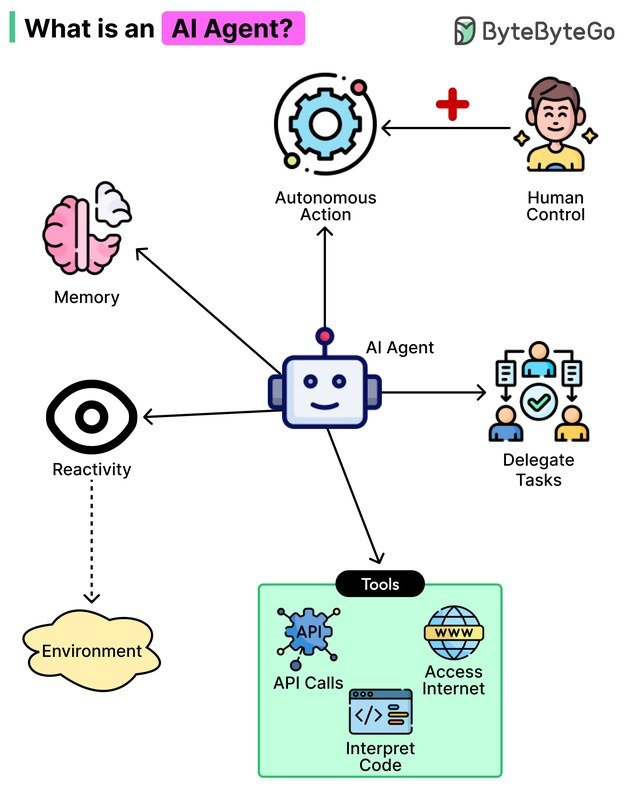
The technology has matured significantly. Modern assistants understand context better, complete multi-step tasks more reliably, and offer deeper integrations than earlier versions. But they are still tools that require setup, maintenance, and occasional troubleshooting. If you are curious about where this technology is heading, our breakdown of how AI agents work step by step explains the next stage of assistant evolution.
- AI assistants have moved from answering questions to taking proactive actions, but they still require deliberate setup to deliver real value.
- Choose based on ecosystem compatibility, privacy controls, and form factor, not just brand loyalty.
- Start small with one device and a few routines, then expand only when the assistant clearly earns its place.
- Review privacy settings regularly and enable confirmation prompts for high-stakes actions.
- For most people, a well-configured assistant is worth the investment; a poorly configured one is just another gadget.
Frequently Asked Questions





One Comment