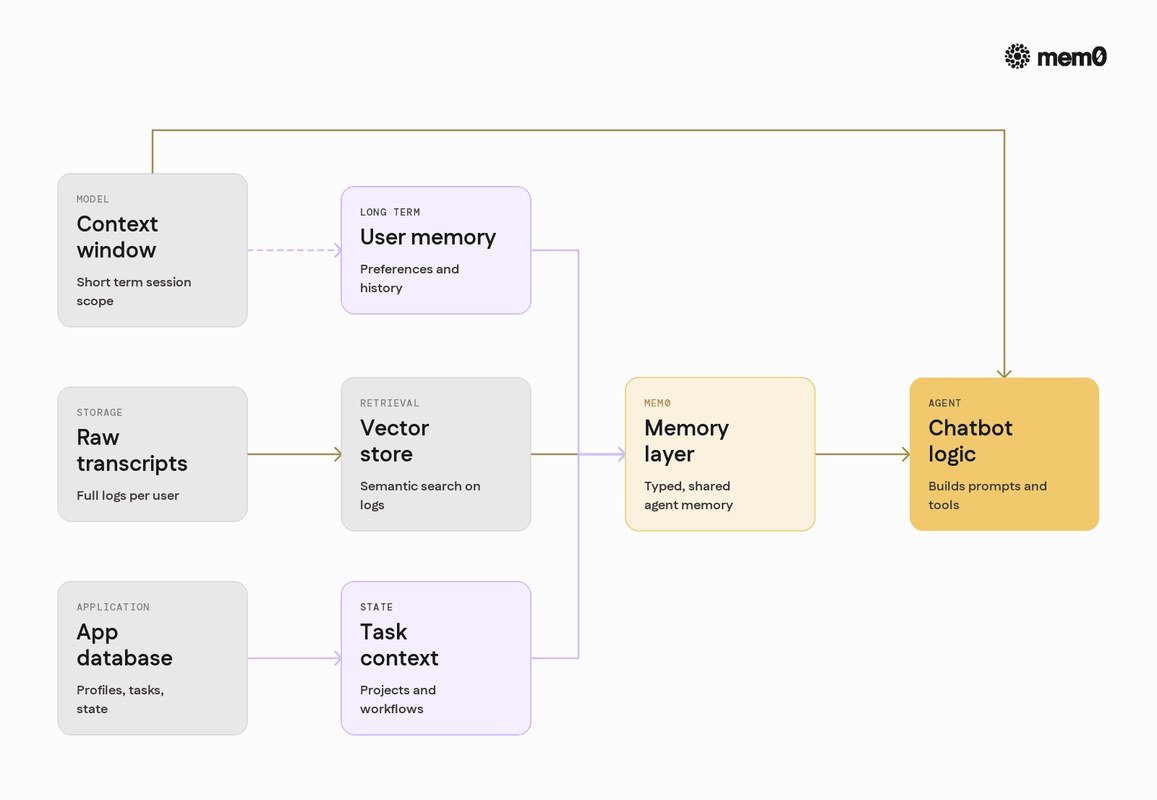
How AI Memory Works in Chatbots The Ultimate Guide
AI memory lets chatbots store and recall information across conversations using context windows, vector databases, and persistent user profiles. It transforms chatbots from forgetful search boxes into personalized assistants, but it requires careful privacy management.
Understanding how ai memory works in chatbots is the key to getting consistent, personalized responses instead of starting from scratch every time you open a chat. By 2026, memory has moved from a technical novelty to a core feature in most major assistants, yet the mechanics behind it remain widely misunderstood.
- Memory types: Chatbots use in-context, retrieval-based (RAG), and persistent profile memory systems that often work together.
- Context limits: Token limits define what a chatbot can hold in working memory, and summarization helps.
- Real benefits: Memory enables personalization, project continuity, and fewer repeated instructions.
- Real risks: Memory decay, hallucination, and data retention are the main downsides to manage.
- Best practice: Use memory for ongoing work, keep it off for sensitive topics, and review stored.
What Is AI Memory in Chatbots and Why It Matters in 2026
AI memory is the set of mechanisms that let a chatbot store, retrieve, and apply information within a conversation or across multiple sessions. Without memory, every message is processed in isolation. With memory, the model can reference what you said earlier, remember your preferences, and build on previous answers.
Why does this matter now? Because the difference between a forgetful chatbot and a memory-enabled one is the difference between a vending machine and a personal assistant. Memory is no longer a premium feature reserved for enterprise tools — it is embedded in consumer assistants, coding copilots, and customer support bots. The quality of that memory, however, varies enormously from one product to the next.
Short-Term vs. Long-Term Memory in Conversational AI
Short-term memory in a chatbot is the immediate context of the current conversation — the messages you have exchanged in this session. It lives inside the model’s context window and disappears when the session ends or the window fills up.
Long-term memory is what persists. It may include a summary of past conversations, a stored user profile with preferences and facts, or entries in a searchable database that the chatbot can consult later. Long-term memory is what allows a chatbot to greet you by name, remember your dietary restrictions, or pick up a project you started last week.
How Memory Transforms the Quality of Chatbot Conversations
Memory changes the feel of a conversation in three concrete ways. First, it eliminates the frustrating loop of repeating yourself — no more re-explaining your context in every message. Second, it enables genuine personalization: the chatbot tailors tone, format, and content to what it knows about you. Third, it creates continuity, so a research session, a coding task, or a creative brainstorm can span multiple chats without losing momentum.
That said, memory is not magic. A chatbot with poorly managed memory can just as easily produce stale, contradictory, or over-confident answers. Understanding the mechanics helps you use the feature wisely — and recognize when a product’s memory claims are mostly marketing.
How AI Memory Actually Works Under the Hood
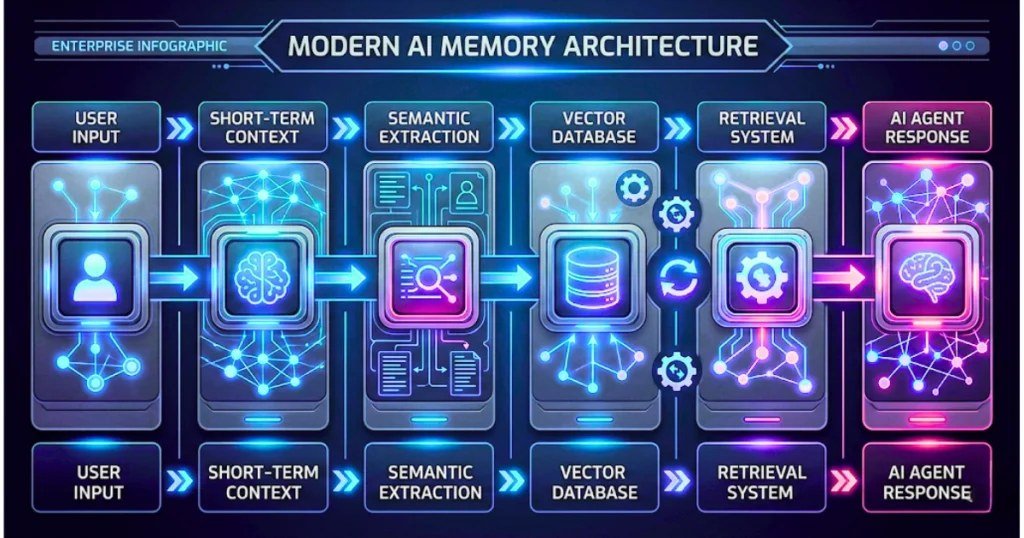
Illustration of a chatbot storing conversation context in memory to generate responses.
Context Windows and Token Limits: The Immediate Memory
Every AI model processes text in small units called tokens — roughly pieces of words. The context window is the maximum number of tokens the model can consider at once. Everything inside that window acts as the model’s working memory: your latest message, earlier turns, system instructions, and any retrieved information.
Context windows have grown dramatically in recent years, but they are still finite. When a conversation exceeds the limit, the oldest content is dropped unless the system does something to preserve it. This is why long chats degrade in quality: the model literally forgets the beginning of the conversation.
Token counts are not the same as word counts. A single word can consume several tokens, and a long document can fill a context window faster than you might expect. Checking a model’s token limit tells you more than its advertised “word” capacity.
Vector Databases and Embeddings: Storing Meaning, Not Just Words
To remember information beyond the context window, chatbots convert text into embeddings — long lists of numbers that capture the meaning of a phrase. These embeddings are stored in a vector database, which supports similarity searches. When you ask a question, the system converts your query into an embedding and retrieves the stored passages whose meaning is closest to it.
This is why a chatbot can “remember” something you said days ago without keeping a full transcript. It stores meaning, not just words, and retrieves only what is relevant to the current request. The trade-off is that retrieval is approximate: relevant information can be missed, and irrelevant information can occasionally surface.
Conversation Summarization and Memory Compression Techniques
When a conversation approaches the context limit, many systems use summarization to compress earlier turns into a shorter digest. The digest keeps the key facts, decisions, and requests while discarding the verbatim exchange. Some systems go further with memory compression techniques: extracting structured facts such as names, dates, and preferences; maintaining rolling summaries that update as the conversation grows; and tiering memory so recent details stay sharp while older details are condensed.
These techniques are why a long chat can still feel coherent — but they also introduce a failure mode. Summaries lose nuance. A fact mentioned in passing may never make it into the digest, and the chatbot will behave as if it never heard you.
Key Types of Chatbot Memory Systems You Should Know
In-Context Memory: What the Model Sees Right Now
In-context memory is the simplest form: everything the model can see in its current context window. This includes your messages, the system prompt, and any tool outputs. It requires no external storage and works instantly, but it is volatile — close the session and it is gone.
External Memory and Retrieval-Augmented Generation (RAG)
Retrieval-augmented generation, or RAG, combines a generative model with an external knowledge store. The system retrieves relevant documents or past conversation fragments and inserts them into the context window before generating a response. This is how chatbots can answer questions about your own documents, past projects, or a company’s knowledge base without retraining the model.
RAG is also the technology behind many AI-powered search features. If you want a deeper look at how retrieval and generation combine in search, our guide to how AI search works covers the same underlying concepts.
Persistent User Profiles: Memory Across Sessions
Persistent user profiles store facts about you — your name, preferences, past requests, and even your communication style — in a structured format that survives across sessions. When a new conversation starts, the chatbot loads the relevant parts of your profile into its context. This is the mechanism behind features like “remember my preferences” or “custom instructions.”
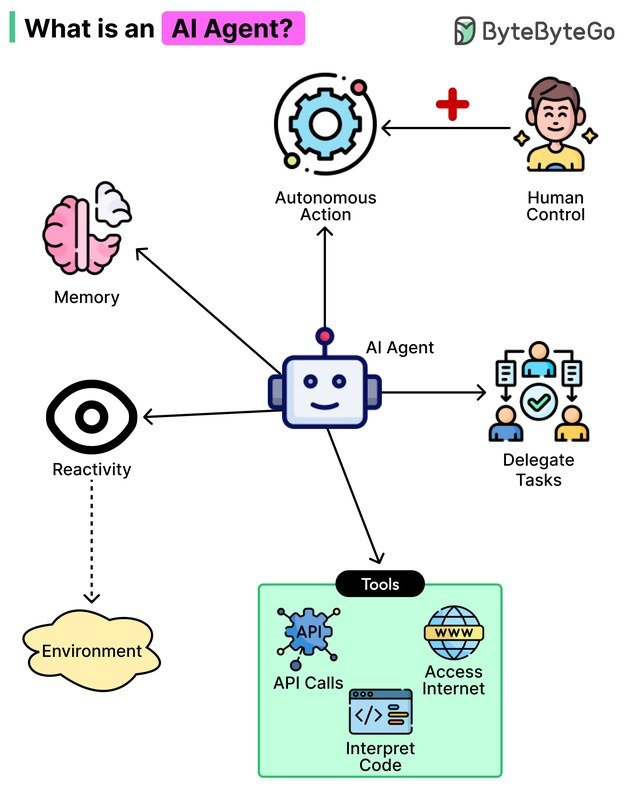
These three systems often work together. A chatbot might use in-context memory for the current exchange, RAG to pull relevant past conversations, and a persistent profile for stable facts about you. The same architecture powers AI agents, which rely on memory to execute multi-step tasks without losing track of their goals.
| Memory Type | How It Works | Persistence | Best For |
|---|---|---|---|
| In-context | Everything in the current context window | Session only | Short, focused conversations |
| RAG / external | Retrieves relevant stored text via embeddings | Long-term, searchable | Document Q&A, knowledge bases |
| Persistent profile | Structured user facts loaded into context | Across sessions | Personalization, continuity |
What to Look for in a Chatbot’s Memory Capabilities<
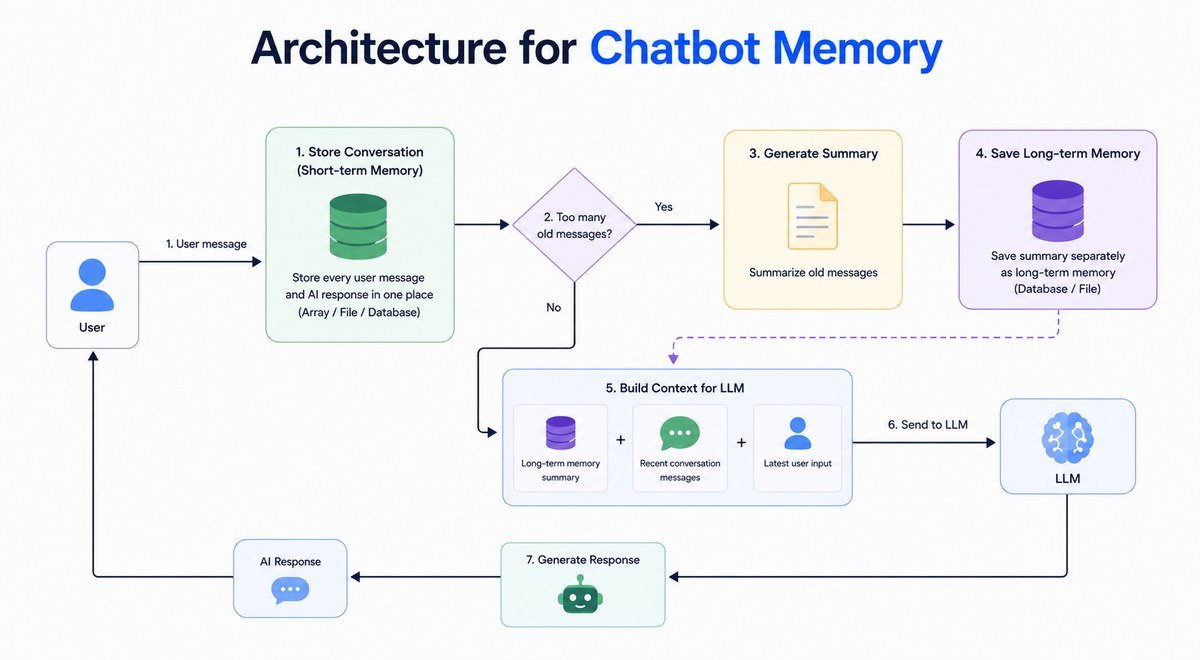
A visual guide to chatbot memory components and data retention.
A visual guide to chatbot memory components and data retention.
Context Window Size and Its Real-World Impact
A larger context window lets a chatbot hold more of your conversation in working memory, which is useful for long documents and complex tasks. But size alone does not determine quality. How the system manages that window — whether it summarizes, prioritizes, or drops content — matters just as much. Two chatbots with identical context limits can perform very differently on a long chat.
Cross-Session Retention and Recall Accuracy
Ask yourself: does this chatbot remember you tomorrow? Cross-session retention varies widely. Some products store detailed profiles and conversation histories; others reset completely. Recall accuracy matters too — a chatbot that confidently misremembers your preferences is worse than one that admits it forgot. Look for products that let you see what they remember and correct mistakes.
User Control, Transparency, and Privacy Safeguards
The best memory systems are transparent. They show you what they have stored, let you edit or delete entries, and offer clear controls for turning memory off. Privacy safeguards are non-negotiable: memory is only useful if the data is stored securely and used only for the purpose you intend. If a product cannot explain what it remembers and why, that is a red flag.
Benefits of AI Memory in Everyday Chatbot Use
Personalization That Actually Feels Personal
Memory turns generic responses into tailored ones. A chatbot that remembers your writing style, your project goals, or your preferred level of detail feels less like a search engine and more like a collaborator. This is the most visible benefit, and it is why memory has become a headline feature in consumer assistants.
Continuity in Workflows, Research, and Creative Projects
For longer projects, memory is a productivity multiplier. A research assistant that remembers which sources you have already reviewed saves you from re-reading them. A coding assistant that remembers your architecture decisions produces more consistent code. A creative partner that remembers your characters and plot threads keeps a novel draft coherent across weeks of sessions. This is where memory moves from convenience to necessity.
Reduced Repetition and Fewer User Corrections
Anyone who has used a memoryless chatbot knows the pain of repeating context in every message. Memory eliminates most of that friction. You state your constraints once, and the chatbot applies them for the rest of the session — and often beyond. Fewer corrections mean faster conversations and less frustration.
Limitations, Risks, and Common Mistakes
Memory Decay and Hallucination: When AI Forgets or Fakes
Memory decay happens when information is dropped, summarized away, or never stored in the first place. The chatbot does not tell you it forgot — it just behaves as if the information never existed. Worse, some models hallucinate when memory is incomplete, inventing plausible-sounding details to fill the gaps. A chatbot that “remembers” something you never said is a sign that its memory system is unreliable.
Privacy Risks of Persistent Memory and Data Retention
Persistent memory means persistent data. If a chatbot stores your conversations, preferences, and personal details, that data becomes a target for breaches, misuse, or accidental exposure. Before enabling memory features, check the provider’s data retention policy and whether you can export or delete your data. For a fuller picture, our guide to protecting your privacy when using AI tools walks through the key safeguards to look for.
Treat persistent chatbot memory like a diary you do not fully control. Avoid storing passwords, financial details, health information, or anything you would not want a stranger to read. Even with strong encryption, the safest data is the data you never share.
Common User Mistakes: Overloading Context and Ignoring Memory Settings
Two mistakes cause most memory-related frustration. The first is overloading the context window: pasting massive documents into a single chat and expecting the model to remember every detail. The second is ignoring memory settings entirely — either leaving memory on when you do not need it, or turning it off and then wondering why the chatbot forgets everything. Understanding the settings is part of using the tool responsibly.
How to Maintain and Manage Chatbot Memory Effectively
Clearing Memory and Starting Fresh Without Losing Progress
Most platforms with memory features let you clear conversation history, delete specific memories, or start a new session. Before clearing, export anything you need — summaries, decisions, or code — so you do not lose progress. A clean slate is often the best fix for a chatbot that has started producing contradictory answers.
Prompt Hygiene and Memory Pruning Best Practices
Prompt hygiene means being deliberate about what you tell the chatbot, knowing it may be stored. State important facts clearly, correct the chatbot when it misremembers, and periodically review what it has stored. Memory pruning — deleting outdated or incorrect entries — keeps the system accurate. A chatbot with clean, well-maintained memory performs noticeably better than one carrying months of clutter.
At the start of a long project, tell the chatbot explicitly what to remember and what to treat as temporary. A simple instruction like “Remember these three constraints for all future sessions” improves recall accuracy far more than assuming the system will figure it out on its own.
Choosing the Right Memory Settings for Your Use Case
Match memory settings to the task. For a one-off question, memory adds nothing — turn it off for privacy. For ongoing work, enable persistent memory but review it regularly. For sensitive topics, use a session-only mode. The right setting depends on how much continuity you need versus how much data you are comfortable storing.
Value Verdict: Is AI Memory Worth It in 2026?
Who Benefits Most from Memory-Enabled Chatbots
Memory-enabled chatbots deliver the most value to people doing ongoing, multi-session work: researchers tracking sources, writers developing long projects, developers maintaining codebases, and professionals who rely on a consistent assistant voice. Casual users benefit too, but the payoff is smaller when conversations are short and self-contained.
- Genuine personalization across sessions
- Continuity for long-term projects
- Fewer repeated instructions and corrections
- Privacy and data retention concerns
- Memory decay and hallucination risks
- Requires active management to stay accurate
Final Recommendation: Adopt, Wait, or Customize
For most users in 2026, the answer is adopt — but with eyes open. Use memory for ongoing projects and personalization, keep it off for sensitive or one-off conversations, and review what the chatbot stores on a regular basis. If a product does not offer transparency and control over its memory, wait for one that does. The technology is genuinely useful, but it rewards users who treat it as a tool to manage rather than a black box to trust.
- AI memory combines in-context, retrieval-based, and persistent profile systems to create continuity.
- Context windows and token limits define what a chatbot can hold in working memory at any moment.
- Vector databases and summarization let chatbots remember meaning beyond the context window.
- Privacy, transparency, and user control are the deciding factors between a good and a risky memory feature.
- Adopt memory for ongoing projects, but manage it actively and keep sensitive data out of persistent storage.
Frequently Asked Questions




2 Comments