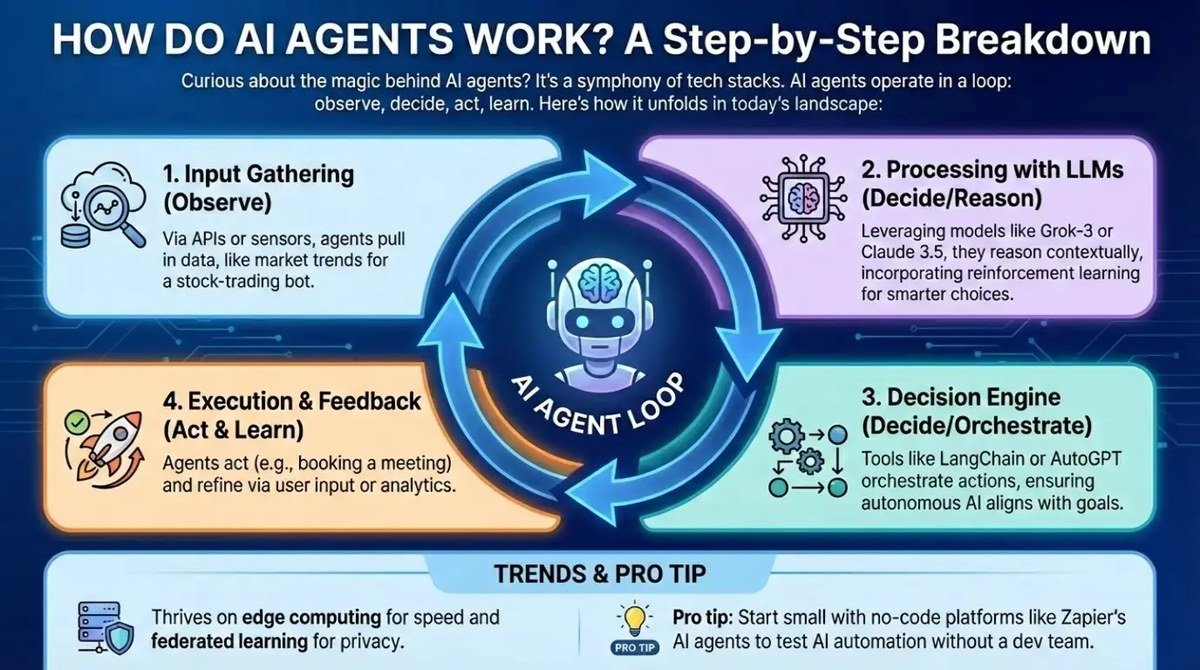
How AI Agents Work Step by Step A Practical Walkthrough
An AI agent is a system that combines a language model with memory, tools, and a planning loop to complete multi-step tasks. It works by parsing a goal, planning subtasks, calling tools, observing results, and producing a verified output.
Understanding how ai agents work step by step is easier than most technical breakdowns suggest, but the difference between a chatbot that answers and an agent that acts changes what you can realistically automate. In 2026, AI agents are no longer a research curiosity; they are scheduling meetings, writing code, running research, and handling support tickets inside ordinary businesses. This walkthrough explains the core anatomy of an agent, the exact loop it runs to finish a task, the specifications that matter, and the practical limits you should know before building one.
- Definition: An AI agent uses an LLM to reason, plan, and act through tools, unlike.
- Core parts: Every agent combines a reasoning engine, short-term and long-term memory, tools, and an orchestration.
- Workflow: Agents parse goals, decompose them into subtasks, call tools, observe results, and re-plan until.
- Key specs: Context window size, function calling reliability, and framework choice drive real-world performance.
- Best practice: Start with a narrow, low-risk task and keep human checkpoints for consequential actions.
What Are AI Agents and How Do They Differ From Chatbots?
A Simple Definition for 2026
An AI agent is a software system that uses a large language model (LLM) as its decision-making core and can take actions beyond generating text. It plans, calls tools, reads the results, and adjusts its next move until the user’s goal is complete.
A chatbot, by contrast, produces conversational replies. It may be helpful, but it does not act. When you ask a chatbot to book a flight, it gives you advice. When you ask an agent, it can search flight options, check availability, fill a booking form, and report back what it did.
Why the Shift From Chatbots to Agents Matters
The shift matters because it changes the interface from asking to delegating. Instead of pulling information one piece at a time, you hand over an outcome and let the system manage the intermediate steps. That is a meaningful jump in what automation can do, and it is also why agents need more careful design than chatbots.
Agents are not magic. They are structured systems that combine a strong language model with memory, tools, and a loop. Understanding those parts is the key to using them well.
The Core Anatomy of an AI Agent
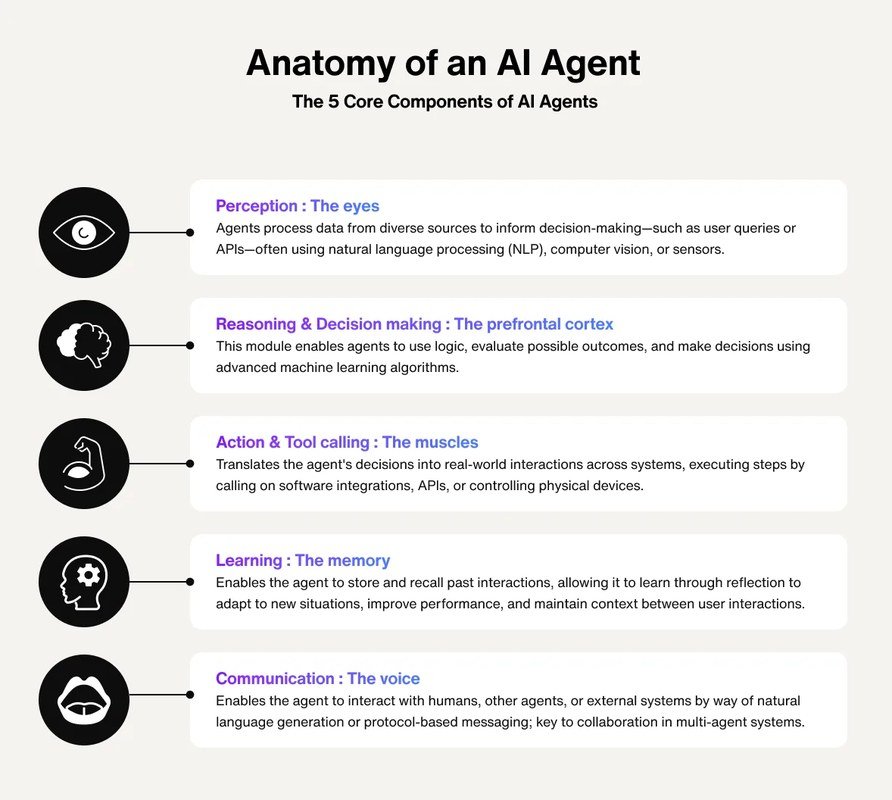
Diagram illustrating the core anatomy of an AI agent with its main functional modules.
The LLM Brain and Reasoning Engine
At the center of every agent is an LLM that does more than generate text. It reasons about the current situation, decides which action makes sense, and produces structured instructions the system can execute. The quality of that reasoning determines how well the agent handles messy, real-world tasks.
Memory: Short-Term and Long-Term Context
Short-term memory is the active context the model works with: the user’s request, the plan so far, and the results of recent tool calls. Long-term memory lives outside the model and persists between sessions. It can include saved user preferences, past project data, or a vector database that lets the agent retrieve relevant documents when a task starts.
Tools and APIs: How Agents Take Action
Tools are the agent’s hands. They can be web search endpoints, calculators, code interpreters, database queries, email clients, or internal APIs that update a CRM. The model does not execute these actions itself; it requests them through a structured interface, and the surrounding system runs the tool and returns the result.
The Orchestration Loop That Ties It Together
The orchestration loop is the engine that keeps everything moving. It repeats a simple cycle: observe the current state, decide the next action, execute the action through a tool, and observe the new result. The loop ends when the agent decides the goal is complete or when it hits a limit and asks for help.
This loop is what separates an agent from a single model call. A chatbot makes one pass. An agent makes many passes, each informed by the last.
Step by Step: How an AI Agent Completes a Task
Step 1: Receive and Parse the User Goal
The agent starts with a raw request, often vague or incomplete. It parses the goal into clear components: what the user wants, what constraints exist, and what information is missing. If the request is ambiguous, a well-designed agent asks a clarifying question instead of guessing.
Step 2: Decompose the Goal Into a Plan
Next, the agent breaks the goal into smaller subtasks and orders them by dependency. For example, a research task might become: search for sources, read the top results, summarize each, compare findings, and draft a final report. The plan can change later, but starting with one keeps the agent focused.
Step 3: Select and Call the Right Tools
For each subtask, the agent chooses the most appropriate tool and formats a valid call. This is where function calling comes in. The model outputs a structured request — tool name, parameters, and arguments — and the system executes it. A good agent also validates the arguments before sending them.
When you design an agent, give each tool a clear description and a strict input schema. The model chooses tools based on those descriptions, so vague tool names lead to wrong calls.
Step 4: Observe Results and Replan
After a tool runs, the agent receives the output and evaluates it. Did the search return useful results? Did the API call fail? Did the code produce an error? The agent uses that feedback to adjust the plan, retry with different parameters, or switch to another tool. This observe-and-replan step is what makes agents resilient.
Step 5: Produce a Final, Verified Output
Finally, the agent compiles everything into a response the user can act on. A strong agent verifies its own work: it checks that the output matches the original goal, flags uncertain parts, and cites or links the sources it used. It also states clearly when a step could not be completed.
Key Specifications and Architecture Patterns to Understand
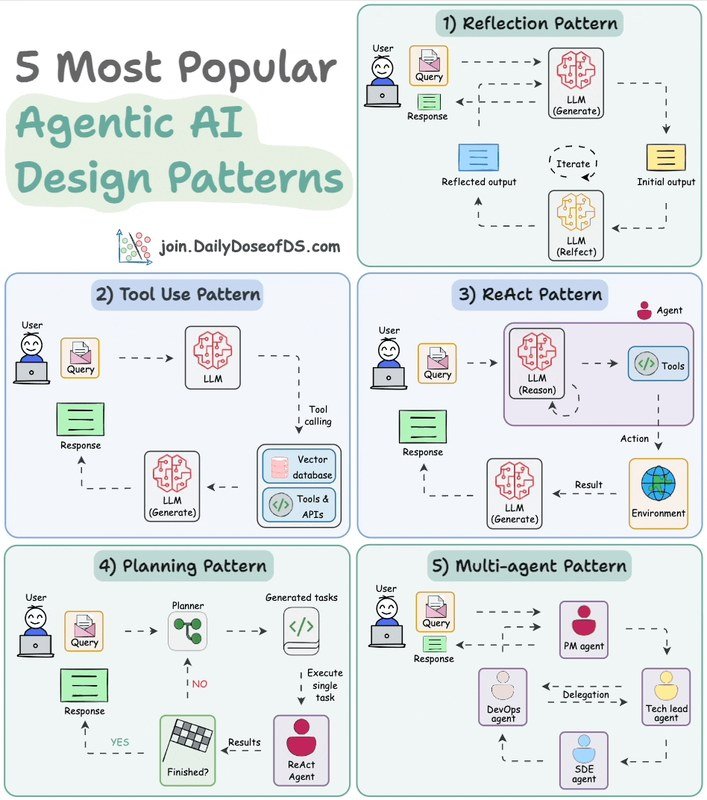
Diagram of AI agent architecture with key components and data flow.
Context Window Size and Length
The context window is the amount of text the model can hold at once. It matters because every tool result, every plan step, and every piece of conversation history consumes tokens. A small context window forces the agent to summarize or drop information; a large one lets it carry more detail but increases cost and latency.
Context window size varies by model and provider. What matters more than the raw number is how the agent manages it — summarizing old steps, trimming history, and keeping only what the next decision needs.
Tool-Calling and Function Calling
Function calling is the technical mechanism that lets the model request tools. The system defines a set of functions with names, descriptions, and parameter schemas. When the model decides a tool is needed, it emits a structured call, and the runtime validates and executes it. Reliable function calling is the difference between an agent that works and one that randomly fails.
Agentic Frameworks and Orchestration Models
Most agents are built on frameworks that handle the loop, memory, and tool integration. Some use a single-agent pattern where one model does all reasoning. Others use a multi-agent pattern where specialized agents handle different subtasks and pass results to each other. The right pattern depends on the complexity of the task and the cost of coordination.
Benefits, Limitations, and Common Mistakes
The Real Benefits of Agentic Workflows
Agents deliver the most value when a task has multiple steps, requires external data, and benefits from iteration. They run around the clock, follow the same process every time, and scale to handle volume that would overwhelm a human team. They also free people to focus on judgment-heavy work.
- Automates multi-step tasks that chatbots cannot touch
- Iterates and self-corrects based on tool results
- Scales consistently across high volumes of work
- Costs can climb quickly on long, multi-tool tasks
- Hallucinations and errors can compound across steps
- Needs careful monitoring and human checkpoints
Limitations You Should Not Ignore
Agents are not fully autonomous in most real deployments. They can hallucinate facts, misread tool outputs, and make confident mistakes. They also depend on the quality of their tools: a broken API or a poorly written function produces bad results no matter how strong the model is. Security is another concern, because giving an agent access to email, payment systems, or internal databases creates new attack surfaces.
Common Mistakes When Building or Using Agents
Most agent failures trace back to a few recurring mistakes: giving the agent too broad a goal, skipping human checkpoints, ignoring error handling, and trusting output without verification. Another common issue is choosing tools that are poorly documented, which leads the model to call them incorrectly.
- Start with a narrow task and clear success criteria
- Add a human review step for high-stakes actions
- Log every tool call and final output for debugging
- Letting an agent act on email or payments without approval
- Giving vague goals like “handle everything”
- Assuming the agent’s answer is correct because it sounds confident
Who Should Use AI Agents and Which Workflows Fit Best
Best Use Cases by Role and Industry
Agents fit best in workflows that are repetitive, rule-based, and measurable. They are less useful in work that demands deep creativity, emotional judgment, or irreversible decisions.
| Role or Industry | Good Agent Workflow | Key Consideration |
|---|---|---|
| Operations | Triaging support tickets and escalating issues | Needs clear routing rules and human review |
| Research | Gathering sources and drafting summaries | Verify citations before publishing |
| Software | Writing tests and fixing routine bugs | Code review still required |
| Sales | Enriching leads and drafting follow-up emails | Keep a human in the send step |
| Finance | Reconciling transactions and flagging anomalies | High stakes; require audit trails |
Use Cases Where Agents Are Not the Right Fit
Agents are a poor fit for tasks that require subjective judgment, sensitive negotiation, or a single correct answer with no room for error. If a mistake is expensive or hard to reverse, a human should stay in the loop. Simple Q&A that a chatbot handles well also does not need agent complexity.
Maintenance, Monitoring, and Long-Term Value
How to Keep an Agent Reliable Over Time
An agent is not a set-and-forget system. It needs logging, versioned prompts, and regular reviews of tool outputs. When the underlying model or an external API changes, behavior can shift, so teams should re-test agents on a fixed set of benchmark tasks after any update.
Evaluating Agent Performance and ROI
Measure what matters: task completion rate, time saved per task, cost per completed task, and error rate. Compare those numbers against the previous manual process. If the agent saves more time than it costs in tokens and oversight, it earns its place. If not, narrow the scope or change the tools.
Final Recommendation: How to Get Started With AI Agents
Start Small: Choose a Narrow, High-Value Task
The best first agent is one that handles a single, well-defined workflow with low risk. Pick something like “summarize incoming support tickets and tag them by category” rather than “manage all customer communication.” Define the inputs, the tools, and the success criteria before you write a single prompt.
A Transparent Verdict on Agent Readiness in 2026
AI agents are genuinely ready for production — but only under supervision. In 2026, the tools, frameworks, and models are mature enough to automate real work, and the teams that succeed treat agents as capable assistants that still need clear boundaries, monitoring, and human approval for consequential actions. Start narrow, verify everything, and expand only when the numbers justify it.
- An agent is an LLM plus memory, tools, and an orchestration loop.
- It works by parsing a goal, planning subtasks, calling tools, observing results, and re-planning.
- Context window, function calling, and framework choice shape real-world performance.
- Start with a narrow, low-risk task and keep a human review step.
Frequently Asked Questions



One Comment