What Is Two Factor Authentication and How It Works
Two factor authentication (2FA) is a login process that requires two different forms of proof, such as a password and a code from your phone, before granting access. It blocks most account takeover attacks even when your password is stolen.
Before you enter another password today, it helps to understand what is two factor authentication and why it has become the most effective step for protecting online accounts. Two factor authentication (2FA) requires two separate proofs of identity before granting access, so a stolen password alone is no longer enough to break in.
- Definition: 2FA requires two different verification factors, not just two passwords.
- Best method: Authenticator apps offer strong security and better convenience than SMS.
- Setup priority: Enable 2FA first on email, banking, and payment accounts.
- Lockout prevention: Save backup codes and keep recovery methods current.
- Limitations: 2FA blocks most attacks but is not a replacement for strong passwords and phishing.
What Is Two Factor Authentication, and Why Does It Matter?
Passwords have a fundamental weakness: they are secrets that can be guessed, stolen, or reused across multiple sites. When a database is breached, millions of passwords can end up in the hands of attackers who then try the same credentials on banking, email, and social media accounts. This practice, known as credential stuffing, is one of the most common ways accounts get taken over. Two factor authentication closes that gap by demanding a second form of proof that an attacker cannot easily obtain.
Two Factor Authentication Definition in Plain English
Two factor authentication is a login process that requires two different forms of verification before you can access an account. The first factor is almost always your password. The second factor is something separate, such as a code sent to your phone, a code generated by an authenticator app, a fingerprint scan, or a physical security key.
The key word is “two.” A login that asks for a password and then a second password is still single factor, because both fall into the same category. True 2FA combines two different categories of proof, which makes it dramatically harder for an attacker to impersonate you. This is why security experts consistently recommend 2FA as the first thing to enable on any account that supports it.
How Two Factor Authentication Works in Practice
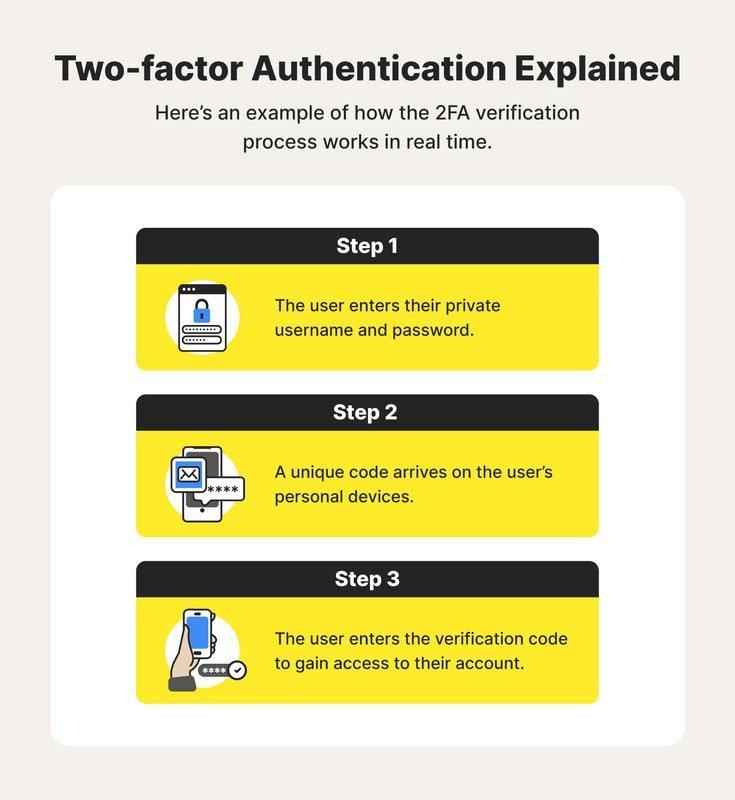
User logs in with a password and a one-time code sent to their smartphone.
The Three Authentication Factors: What You Know, Have, and Are
Security systems group all forms of verification into three categories:
- Something you know: passwords, PINs, and security answers.
- Something you have: a smartphone, authenticator app, hardware key, or SIM card.
- Something you are: fingerprints, face scans, or voice patterns.
Two factor authentication works by combining two of these categories. A password plus a code from your phone is the most common setup. A hardware key plus a fingerprint is another strong example. The logic is simple: an attacker who steals your password still lacks the second factor, and an attacker who steals your phone still lacks your password.
The Step-by-Step Flow of a Secure 2FA Login
This is the first factor, something you know. The system checks that the password matches the account.
You enter a time-based code from an authenticator app, approve a push notification, or tap a hardware key. This proves you possess the second factor.
Once both factors check out, the service creates a trusted session. You may not need to repeat the second factor on that device for a set period.
This flow takes only a few seconds, and most services remember trusted devices so you only complete the full 2FA process occasionally. App-generated codes are typically valid for a short window of around 30 seconds, which limits how long a stolen code can be used by someone else.
2FA Methods Compared: SMS, Authenticator Apps, Hardware Keys, and Biometrics
Security Strength vs. Day-to-Day Convenience
| Method | Security Strength | Convenience | Best For |
|---|---|---|---|
| SMS codes | Low to moderate; vulnerable to SIM swapping | Very convenient; works on any phone | A first step when no app is available |
| Authenticator apps (TOTP) | High; codes are generated offline on your device | Convenient; no signal needed | Most people’s default choice |
| Push notifications | High; tied to your device account | Very convenient; one-tap approval | Services that support app-based prompts |
| Hardware keys | Highest; resistant to phishing | Requires carrying a physical device | Security-conscious users and businesses |
| Biometrics | High when used as a second factor | Fast; no code to type | Phone and laptop logins |
SMS codes are still better than no 2FA, but they have a known weakness: attackers can sometimes redirect your phone number through a SIM-swap scam. Authenticator apps avoid that problem because the codes are generated on your device and never travel over the cellular network. Hardware keys offer the strongest protection because they use public-key cryptography and cannot be tricked by phishing websites. Biometrics such as fingerprints and face scans are convenient, but they should generally be paired with a password or key rather than used alone.
When choosing a method, think about the accounts you are protecting. A banking app can justify a hardware key, while a forum account is fine with an authenticator app. The best method is the one you will actually use consistently.
What to Look for When Setting Up Two Factor Authentication<

A phone shows a two-factor authentication setup screen with a QR code.
A phone shows a two-factor authentication setup screen with a QR code.
Protocol Support, Recovery Options, and Backup Codes
Not every service offers the same 2FA options. Before you commit to a method, check which protocols the service supports. The most common standard for authenticator apps is TOTP (time-based one-time password). For hardware keys, look for FIDO2 or WebAuthn support, which are the modern standards behind passkeys.
When you enable 2FA, save the backup codes immediately and store them somewhere safe, like a password manager or a locked document. These one-time codes are the only way back in if you lose your phone or security key.
Also review your recovery options. A recovery email address that you no longer control, or a phone number that has changed, can turn 2FA from a safeguard into a lockout. Keep recovery methods current, and consider registering more than one second factor, such as a backup authenticator app on a second device.
Who Should Use Two Factor Authentication in 2026
Individuals, Businesses, and High-Risk Accounts
The honest answer is that everyone with an online account should use 2FA, but some accounts deserve priority. Your email address is the highest-risk account you own because it is the recovery hub for almost everything else. If an attacker gains control of your email, they can reset passwords across banking, social media, and shopping sites. Turn on 2FA for email, financial accounts, cloud storage, and any account that stores payment details.
Businesses have a stronger obligation. A single compromised employee account can expose customer data and internal systems. Many organizations now require 2FA for remote access, email, and administrative panels, and some use hardware keys for employees with elevated permissions. In 2026, passkeys have also become a mainstream option on major platforms, offering a password-free experience that still counts as strong two factor authentication when combined with a device unlock method.
Understanding your own digital footprint helps clarify which accounts matter most: the more personal data an account holds, the more damage a takeover can cause.
The Benefits and Limitations of Two Factor Authentication
- Blocks the vast majority of account takeover attempts, including most phishing attacks
- Protects you even when your password is exposed in a data breach
- Adds only a few seconds to the login process
- Gives you a clear signal when someone tries to access your account
- Can lock you out if you lose your phone or hardware key and have no backup codes
- SMS-based 2FA is vulnerable to SIM swapping
- Adds friction to every new device login
- Does not protect against every threat, such as session hijacking after you log in
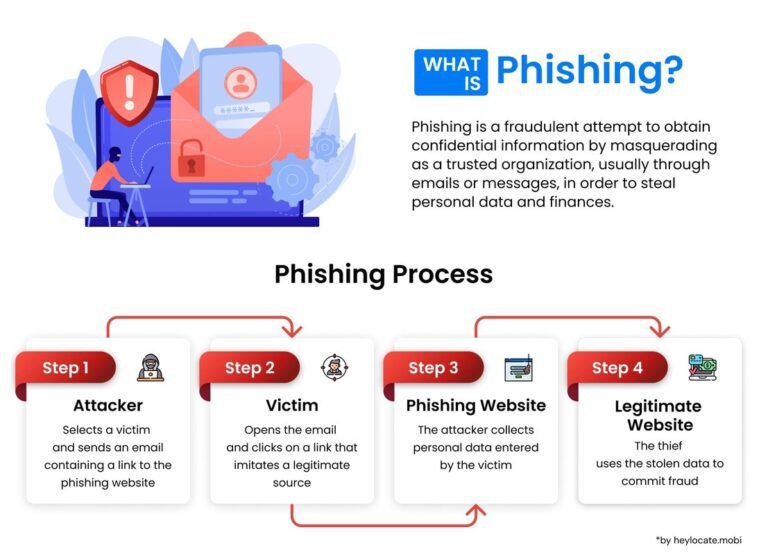
Two factor authentication is not a magic shield, but it raises the cost of an attack so much that most criminals move on to easier targets. It works best when combined with other basics like strong unique passwords, cautious clicking, and a clear understanding of data privacy practices.
Common Two Factor Authentication Mistakes and How to Avoid Them
Lockouts, Lost Devices, and Recovery Email Gaps
- Save backup codes in a password manager or printed copy
- Register a second device as a backup authenticator
- Keep your recovery email and phone number up to date
- Use an authenticator app instead of SMS whenever the service offers it
- Ignoring backup codes after setup; you will need them eventually
- Using the same phone number for recovery without protecting the SIM
- Turning off 2FA out of frustration after a temporary lockout
- Storing backup codes in the same email account they protect
The most common 2FA failure is not a security breach; it is a self-inflicted lockout. People lose their phone, switch numbers, or clear their authenticator app without saving recovery codes. A few minutes of preparation at setup time prevents most of these problems.
Final Recommendation: Make Two Factor Authentication Part of Your Routine
Start with your most sensitive accounts: email, banking, and any account that can reset your other passwords. Choose an authenticator app as your default method, save the backup codes, and keep your recovery information current. Once the habit is in place, the extra seconds are a small price for the protection you gain.
- Two factor authentication requires two different proof types: something you know, have, or are.
- Authenticator apps offer stronger security than SMS with similar convenience.
- Backup codes and current recovery methods prevent lockouts.
- Email, banking, and payment accounts deserve 2FA first.
- Combine 2FA with strong passwords and phishing awareness for the best protection.
Frequently Asked Questions