How to Detect Deepfake Videos with 5 Proven Methods
Detect deepfakes by layering five checks: visual artifacts, audio and lip-sync, automated tools, metadata and source verification, and contextual red flags. No single method is foolproof, so always combine several before trusting a video.
Knowing how to detect deepfake videos is no longer a niche technical skill; it is a basic digital-literacy habit that protects you, your workplace, and your family from manipulated media. Deepfake technology uses deep learning models to swap faces, alter voices, and even fabricate entire scenes, and by 2026 the tools have become cheaper, faster, and harder to spot with the naked eye. This guide walks through five practical detection methods, explains their limits, and gives you a simple verification routine you can use before you trust, share, or act on any video.
- Visual scan: Check eye reflections, blinking, teeth, lighting, and skin texture for generation artifacts.
- Audio check: Listen for flat voice tone, missing breathing, and lip movements that lag behind speech.
- Automated tools: Use detectors as a second opinion, never as a final verdict, and check their.
- Source verification: Inspect metadata, look for C2PA watermarks, and reverse-search still frames.
- Context matters: Shocking or urgent videos from unverified accounts deserve extra skepticism regardless of quality.
What Are Deepfake Videos and Why Detection Matters in 2026
A deepfake is a video or audio clip generated by artificial intelligence that mimics a real person’s appearance, voice, or both. The term blends “deep learning” and “fake,” and the technology has evolved rapidly from obvious face-swaps to realistic, real-time manipulations. In 2026, deepfakes are no longer just a celebrity novelty; they are used in romance scams, business email compromise, political misinformation, and even fake job interviews. Detection matters because the consequences of believing a convincing fake can be severe: financial fraud, reputational damage, legal trouble, and public panic.
The good news is that most deepfakes still leave traces. No generation model is perfect, and the artifacts they produce—visual, auditory, and contextual—are detectable if you know what to look for. The methods below are arranged from quick visual checks to deeper forensic verification, so you can use them whether you have ten seconds or ten minutes.
Deepfake technology builds on the same generative AI foundations that power text and image tools. If you are new to how these models work, understanding the basics of generative AI makes it easier to grasp why fake videos behave unnaturally in the first place.
Method 1: Scan for Visual and Facial Artifacts
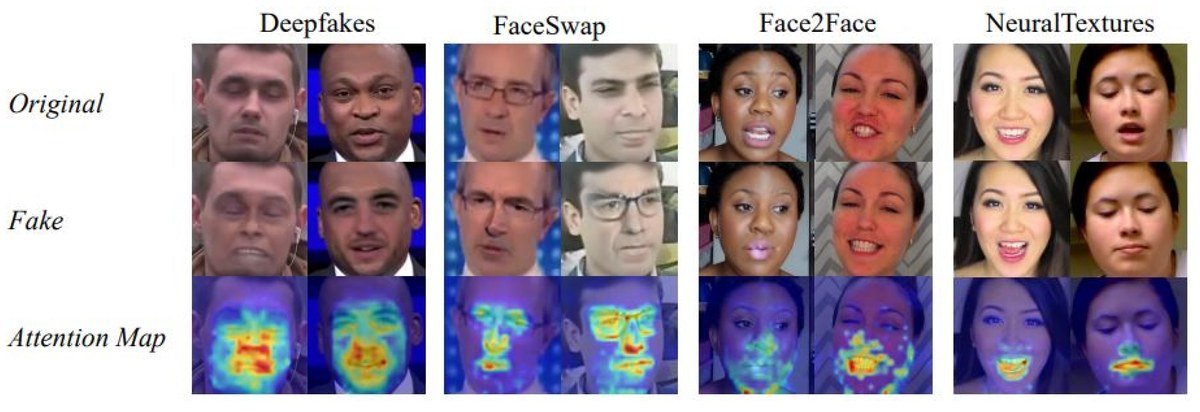
Facial artifacts such as blurring and warping reveal signs of a deepfake video.
The fastest way to check a video is to watch it closely, then slow it down and pause on individual frames. Deepfake generators struggle with several physical details that real human faces get right every time. You do not need special software—just a sharp eye and a willingness to look at awkward freeze-frames.
Eyes, Blinking, and Teeth Anomalies
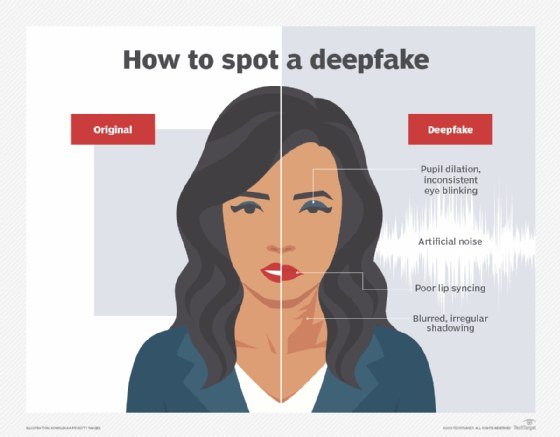
Look at the eyes first. Real eyes produce consistent reflections and sharp highlights; fake eyes often have mismatched reflections between the left and right pupil, or a blurry, “painted-on” look. Blinking is another clue. Older deepfake models produced characters that rarely blinked, while newer models may blink at odd, unnatural intervals or squeeze the eyelids too smoothly. Teeth are also a surprisingly reliable tell: many generators render teeth as a single blurred mass or add extra, indistinct edges. If the mouth looks “mushy” during close-ups, treat that as a red flag.
Lighting, Shadows, and Skin Texture Mismatches
Lighting is hard to fake. Check whether the light on the face matches the light in the background. Look at the nose shadow, the catchlights in the eyes, and the direction of the shadow under the chin. If the face looks slightly brighter, warmer, or softer than the rest of the scene, the face may have been composited onto someone else’s body. Skin texture also betrays fakes. Real skin has pores, fine hairs, and subtle blemishes that shift naturally as the head moves. Deepfakes often smooth these details into a plastic-like finish, especially around the jawline, hairline, and ears. Pause the video and zoom in on the edges of the face; a soft, smeared border is a common artifact.
Watch the video at half speed or frame-by-frame. Many artifacts appear for only a split second when the face turns, blinks, or transitions between expressions. Pausing on those exact frames makes the flaws much easier to catch than watching in real time.
Method 2: Analyze Audio and Lip-Sync Synchronization
Deepfake audio has improved dramatically, but synchronizing generated speech with generated lip movements remains one of the hardest problems in the field. The mismatch between what you hear and what you see is often your strongest clue.
Lip Movement vs. Speech Timing Errors
Watch the mouth carefully while listening to the words. In a real video, the lips close fully on “p,” “b,” and “m” sounds, and the jaw moves slightly ahead of the sound. In a deepfake, the lips often lag behind the audio, close too early, or make small, rubbery movements that do not match the spoken phonemes. This is especially noticeable on hard consonants and at the end of sentences, where the mouth should settle into a clear resting position.
Voice Quality, Pitch, and Background Noise Clues
Listen to the voice itself. Generated voices often have a slightly flat, “telephone-like” tone, with unnatural pauses and a pitch that drifts in and out. Breathing sounds are frequently missing, and background noise may cut out abruptly whenever the person speaks. If the voice sounds too clean, too robotic, or does not match the person’s known accent and speech patterns, treat the video with suspicion. Audio analysis works best when you have a reference clip of the same person speaking; compare cadence, accent, and vocal tone against a known recording when one is available.
Method 3: Run Automated Deepfake Detection Tools
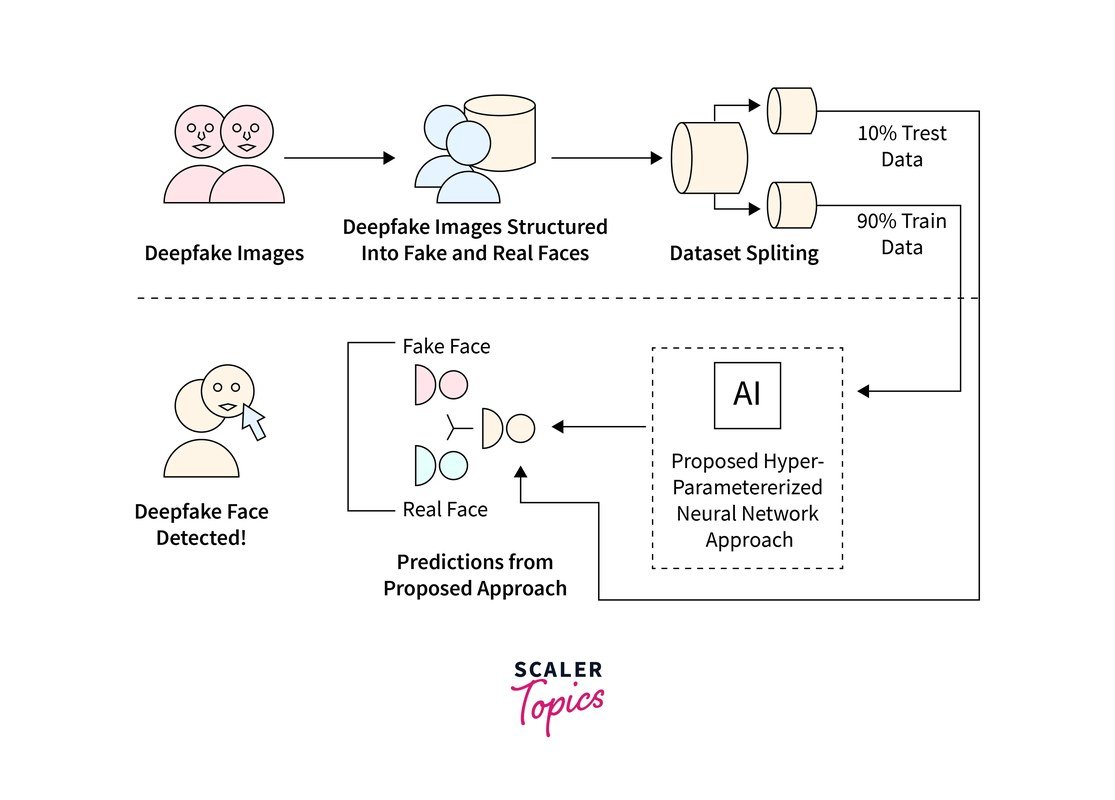
An automated tool analyzes video frames for deepfake indicators.
Human eyes are good, but automated tools can catch patterns that our brains cannot see. Several free and commercial detectors analyze video frames for the subtle statistical fingerprints left by generative models. These tools are especially useful when a video looks convincing but you still feel something is off.
What to Look for in a Detection Tool
A useful detection tool should do more than give a simple “fake” or “real” verdict. Look for tools that provide a confidence score, highlight the regions of the frame that triggered the alert, and work on the type of video you are checking—face-swap, full synthesis, or audio-only. Many university and nonprofit projects offer free web-based detectors, while commercial products add batch scanning and detailed reports. Before you upload a sensitive video, check the tool’s privacy policy; some services keep a copy of whatever you submit, which matters if the video contains personal or confidential content.
The Real-World Limits of Automated Software
No detector is perfect. A tool trained on older deepfake models may miss newer ones, and a video that has been compressed, re-encoded, or shared through social media loses the fine details that detectors rely on. Automated tools are best used as a second opinion, not a final verdict. A negative result does not prove a video is real; it only means the tool did not find signs of the particular generation method it was trained to recognize.
- Run the same video through two or three different tools and compare the results.
- Check the tool’s privacy policy before uploading anything sensitive.
- Treat a “real” verdict as one data point, not proof.
- Uploading private or confidential videos to unknown websites.
- Relying on a single tool’s score to make a final decision.
- Assuming a low-quality, heavily compressed video will produce reliable results.
Method 4: Verify Metadata, Watermarks, and Source Provenance
The file itself can carry evidence. Metadata, watermarks, and the video’s origin story often reveal more than the pixels do. This method takes a little more effort, but it is the most reliable way to confirm a video’s history.
Reading File Metadata and Digital Watermarks
Video files store metadata: creation date, camera model, software used, GPS coordinates, and editing history. A video claiming to be a live phone recording but saved with professional editing software in its metadata is a strong red flag. You can inspect metadata on a computer by viewing the file’s properties or using a free metadata reader. Some cameras and platforms also embed invisible digital watermarks, such as C2PA or Content Credentials, that record the video’s editing history. If the watermark shows a generative AI tool in the chain, the video has been manipulated.
Reverse Search and Cross-Referencing the Source
Reverse image search is one of the simplest and most effective checks. Take a high-quality still frame from the video and run it through Google Images, TinEye, or a similar service. If the same face appears on an unrelated older video, the clip is a fake. Then ask basic provenance questions: Who originally posted the video? When? On what platform? Does the account have a history of posting this person’s content? A video that appears suddenly on a brand-new account with no prior history deserves extra skepticism.
- View file properties or run a free metadata reader.
- Look for Content Credentials or C2PA watermark symbols.
- Reverse-search a high-quality still frame from the video.
- Check the posting account’s history and creation date.
- Search the person’s name plus the video topic to find the original source.
Method 5: Apply Behavioral and Contextual Checks
Sometimes the content itself is the biggest clue. Humans have unconscious behavioral patterns that deepfake models still struggle to replicate convincingly, and the circumstances around a video often tell the real story.
Micro-Expressions, Blinking, and Unnatural Movements
Real faces produce micro-expressions—brief, involuntary facial movements that last a fraction of a second. Deepfakes tend to produce exaggerated, delayed, or missing micro-expressions. Watch for emotions that do not match the words: a smile that appears too late after a joke, or an angry expression that never reaches the eyes. Unnatural head movements are another tell. A real person’s head moves smoothly with small, constant adjustments; a deepfake often holds the head too still, then jerks it suddenly during a transition.
Contextual Red Flags: Who Sent It and Where It Appeared
Context matters as much as pixels. Ask why you are seeing this video. A politician making a shocking statement, a CEO announcing a surprise product, or a celebrity saying something controversial—these are exactly the scenarios where deepfakes are deployed. If the video arrived via an unexpected email, a forwarded message, or a social media account with no history, that is a red flag regardless of how real it looks. Check the official channels: if the person in the video has not posted the same statement on their verified accounts, consider the video unverified. This contextual check is often the fastest way to avoid being fooled, and it costs nothing.
Common Mistakes and Limitations of Deepfake Detection
Even with the right methods, people make predictable mistakes. Understanding these limitations keeps your verification routine honest and prevents you from overconfidence.
Over-Reliance on a Single Detection Method
The biggest mistake is trusting one clue. A video may have perfect lip-sync but bad lighting; another may have flawless visuals but a robotic voice. Any single method can be fooled. The only reliable approach is to layer multiple checks—visual, audio, automated, source, and contextual—and weigh them together. If two independent methods raise flags, treat the video as fake until proven otherwise.
The Evolving AI Arms Race and Why 100% Accuracy Is Impossible
Deepfake generation and detection are locked in a constant arms race. Every time researchers publish a new detection technique, generation models are retrained to avoid it. By 2026, the best consumer-grade deepfakes can fool casual viewers and many automated tools, and researchers openly acknowledge that perfect detection is mathematically impossible for videos that have been heavily compressed or re-encoded. This does not mean detection is useless; it means you must stay humble, stay updated, and never assume any single video is beyond suspicion. As AI becomes more embedded in daily routines, the same technology that powers deepfakes also powers the systems that catch them—which is one more reason AI is changing everyday life in both risky and protective ways.
Final Recommendation: Build a Layered Verification Habit
Deepfake detection is not a one-time skill; it is a habit. The goal is not to become an expert forensic analyst but to build a repeatable checklist that catches the vast majority of fakes before they cause harm.
Keep Your Skills and Detection Tools Updated
Set a simple routine. When you encounter a video that matters—one you might share, act on, or use as evidence—run it through the five methods in this guide: scan for visual artifacts, check audio and lip-sync, run an automated tool, verify metadata and source, and apply a contextual sanity check. Bookmark two or three detection tools and revisit them every few months, because detectors improve and change. Follow responsible AI news so you know what new generation techniques are emerging.
Finally, protect yourself at the source. Be careful about what video and audio of yourself you post publicly, since that content can be used to train or target deepfakes. If you are concerned about your own digital safety, learning how to protect privacy when using AI tools is a valuable next step.
- Look for visual artifacts: inconsistent eye reflections, blurry teeth, mismatched lighting, and plastic-looking skin.
- Check audio and lip-sync: lagging lips, flat voice tone, and missing breathing sounds are red flags.
- Use automated detectors as a second opinion, not a verdict, and check their privacy policies first.
- Verify metadata, watermarks, and the video’s source through reverse search and official channels.
- Always layer multiple methods and apply a contextual check; no single clue proves a video is real.
The bottom line: knowing how to detect deepfake videos is a practical, learnable skill. You do not need a degree in computer science—just a healthy dose of skepticism, a simple checklist, and the willingness to pause before you believe or share. Start with the visual scan, confirm with audio and source checks, and let automated tools support—not replace—your own judgment.
Frequently Asked Questions